



AI Coding Tools · Debugging · AI Code Debugger · Production Runtime
The AI Code Debugger That Finds What’s Actually Breaking in AI-Generated Code
Copilot, Cursor, Claude Code, and Codex move code from prompt to pull request fast. Production is where the confidence gap shows up. Dstl8 is an AI code debugger that finds root cause fast from real runtime signal and improves code quality, so you can debug AI-generated code before bugs turn into outages.
brew install control-theory/dstl8/dstl8
Zero
Runtime Certainty from Autocomplete Alone
55.8%
Faster Task Completion with Copilot
43
CWE Categories Seen in AI-Generated Code Study
2 min
Time to First Insight
Fast
AI Code Debugging Workflow
Four failure modes
Four Ways AI-Generated Code Fails After It Looks Done.
AI-generated code often passes the vibe check before it passes production reality. The common failure is not syntax. It is hidden assumptions about data, auth, environment, and edge cases. That is where AI debugging has to start: from what the running system actually did.
01
Autocomplete matched the local context, not the live response shape
GitHub autocomplete is optimized to continue what looks plausible in the editor. Real APIs return nullable fields, different types, missing keys, or plan-specific payloads. The generated branch merges cleanly. The first production request is where the mismatch appears.
# Copilot inferred from nearby code
const status = page.status.toLowerCase()
const url = page.html_url
# Live response under a different permission scope
page.status null
page.html_url undefined
TypeError · Cannot read properties of null
tests: passing on fixture
02
Copilot can propose a fix. It cannot guarantee the failure mode is the one you selected
Slash commands like /fix are useful for fast iteration, but they operate on the code and context you provide in the chat. If the real root cause lives in a missing environment variable, a hidden retry path, a stale remote, or an auth boundary, the patch can look reasonable while missing the actual incident.
# Selected code looked broken
git.push(origin, branch)
# Real issue
remote: Repository not found
fatal: unable to access remote URL
# Patch suggested
retry(push, 3)
# Root cause: wrong remote or missing permission
03
GitHub Spark and AI app builders compress build time, not debugging time
GitHub Spark can generate a full-stack app with storage, AI features, GitHub auth, and one-click deployment. That reduces setup work dramatically. It does not remove the need for ai code analysis once live traffic, auth scopes, or data mutations hit paths the prototype never exercised.
# Spark demo path
Only you · seeded data · preview works ?
# First shared session
GitHub auth token scope differs
managed store record missing
blank UI · silent 500 · no user context
04
Legacy code makes AI code assistants reliability worse, not better, when your mental model is already thin
AI code assistants reliability for legacy code drops when the repository has partial types, undocumented side effects, historical naming, and weak observability. Copilot can still write plausible edits and code review summaries. But when the incident lands, you are debugging logic nobody on the team fully reconstructed.
# Friday refactor
“cleanup auth middleware (copilot)”
# Monday incident
GitHub 403 push repository fix? not this time
session refresh loop · users signed out
three services changed · one root cause
Why should you care?
The productivity gain is real. So is the verification gap. Research and field reports point in the same direction: AI-generated code can move faster while still carrying correctness, security, and runtime reliability risk that only appears after merge or deploy.
The solution
How Teams Debug AI-Generated Code Without Guessing.
The goal is not to stop using Copilot. The goal is to debug AI code reliably when GitHub Copilot code review, GitHub Spark, and autocomplete accelerate more changes than humans can manually reason through.
See the runtime mismatch before it becomes a support thread
Whether it is how to fix GitHub code, how to fix GitHub Pages, or a GitHub Spark AI prototype that breaks on real auth, the live signal tells you which assumption failed.
Separate platform errors from application bugs
GitHub repository not found error fix, GitHub 403 error push repository fix, and GitHub Pages 404s often look like app regressions until you correlate remote config, auth, deploy events, and code paths in one place.
Turn AI code analysis into an answer, not another prompt
Use Copilot to generate and revise code. Use production telemetry to determine what actually failed. That is how you improve code quality assurance instead of adding more speculative patches.
Debug across app, deploy, auth, and repository events
One incident often spans several layers: Copilot-generated handler, GitHub auth, Pages publish source, remote URL, token scope, and downstream API behavior. Root cause needs all of it.
Know when to pause autocomplete and inspect reality
Sometimes the fastest fix is to turn off Copilot autocomplete, reproduce the failing path, inspect the logs, and re-enable assistance only after the team understands what the system is actually doing.
What you get
What an AI Code Debugger Looks Like When It Works.
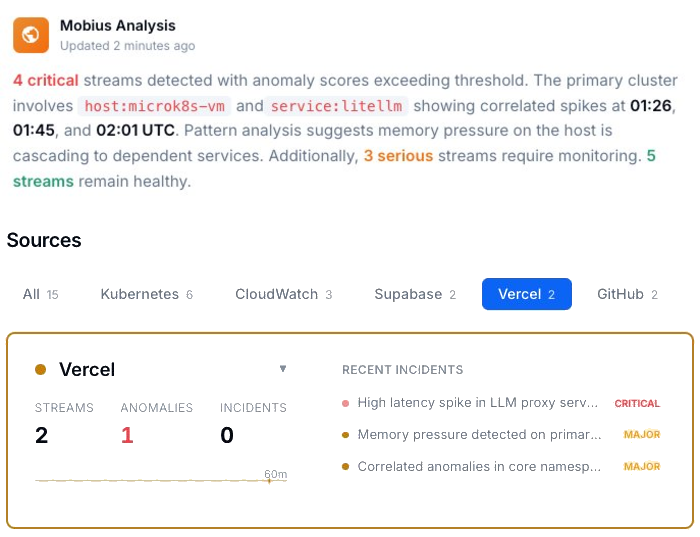
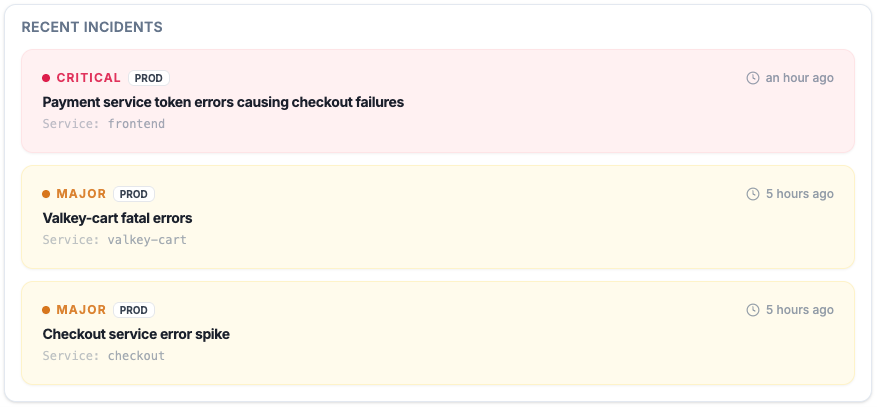
Active Incidents
See which AI-generated failures are real, which are noisy, and which are spreading.
Instead of digging through scattered logs after a github copilot bug lands, you get a prioritized incident view with timestamps, severity, and evidence connected to the runtime.
Code Quality
Improve code quality without slowing down authorship.
24.2% JavaScript snippets affected in one security study
AI-assisted output can be productive and still carry security and reliability debt. Code quality assurance starts after generation, not before it.
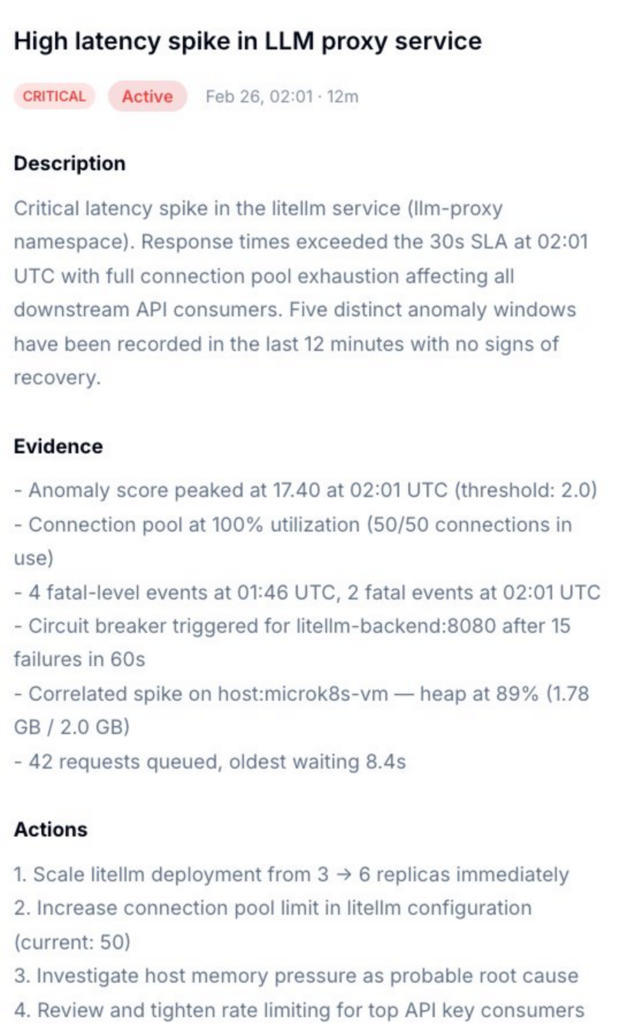
Incident Detail
Root cause, evidence, and next actions in one place.
Get a diagnosis that tells you whether the failure belongs to auth, data shape, environment drift, missing publish artifact, or an actual code path regression from GitHub Copilot code.
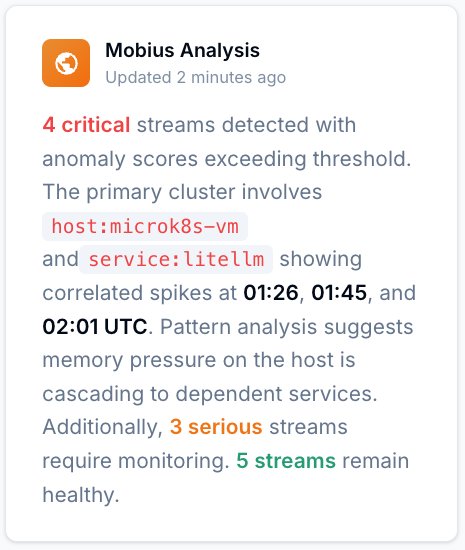
Mobius
AI debugging in Plain English — Ask what changed, what broke, and what is correlated.
Natural language over real telemetry. Use it to investigate github copilot code, github spark copilot apps, or legacy services touched by AI suggestions without starting from a blank terminal.
Get Started
Start with Gonzo — free, open source, 2 minutes.
2K+ GitHub stars
Use Gonzo to inspect what your AI-generated code is doing in production before you ask for another fix, another review, or another autocomplete.
Full vibe stack debugging
Debugging AI-Generated Code: Your Options.
Capability
Catch runtime mismatches hidden by github autocomplete
Separate GitHub Pages, auth, and repository errors from app bugs
Use /fix on top of verified incident evidence
Cross-service pattern detection for ai code risk
Improve code quality with production feedback loops
Time to first insight
Manual
Hours
AI-Tool-Only Workflow
Prompt by prompt
ControlTheory
2 minutes
Why it’s different
AI Code Debugging Is Not Traditional Debugging.
When you debug code you wrote, you start with a mental model of what it was supposed to do. With AI-generated code, that model doesn’t exist — the failure modes, the signal-to-noise ratio, and the time horizon are all different. Here’s what changes.
You’re debugging unfamiliar code.
You didn’t write it, so you can’t reason from intent. You have to reason from behavior — what the code actually did at runtime, not what it was meant to do.
The failure modes are novel.
AI tools autocomplete against patterns, not against your runtime. Edge Runtime mismatches, hallucinated APIs, and silent type coercion produce failures nobody wrote an alert for.
The volume is 10x.
AI ships more code, more often, generating more log volume. The one line that explains the failure is buried deeper than it has ever been.
Speed of detection matters more.
Code ships in seconds. If detection takes hours, the gap between “shipped” and “found the bug” is where outages live.
Common questions
AI Code Debugging — Questions from Engineering Teams.
Get started
Install & Configure Dstl8 in Under 2 Minutes.
Try the Dstl8 CLI and TUI for continuous runtime feedback. Install it, add sources, connect the MCP server into Claude Code, and more.
brew install control-theory/dstl8/dstl8
dstl8 signup
curl -fsSL https://install.dstl8.ai/script/dstl8-cli | shnpx dstl8nix run github:control-theory/dstl8Download from https://github.com/control-theory/dstl8/releasesQuick Start
# 1. Install the CLI
brew install control-theory/dstl8/dstl8

# 2. Create a Dstl8 account (or `dstl8 login` if you already have one)
dstl8 signup

# 3. Add a source so logs flow in
dstl8 sources add vercel

# 4. Connect your AI agent, auto-detects MCP-compatible clients on your machine and configures them
dstl8 install --all
dstl8 install claude-code
Add Sources
# Add Sources

dstl8 sources add kubernetes
dstl8 sources add cloudwatch
dstl8 sources add vercel
dstl8 sources add supabase
dstl8 sources add otlp
dstl8 sources add github
Start Here
See what’s actually happening.
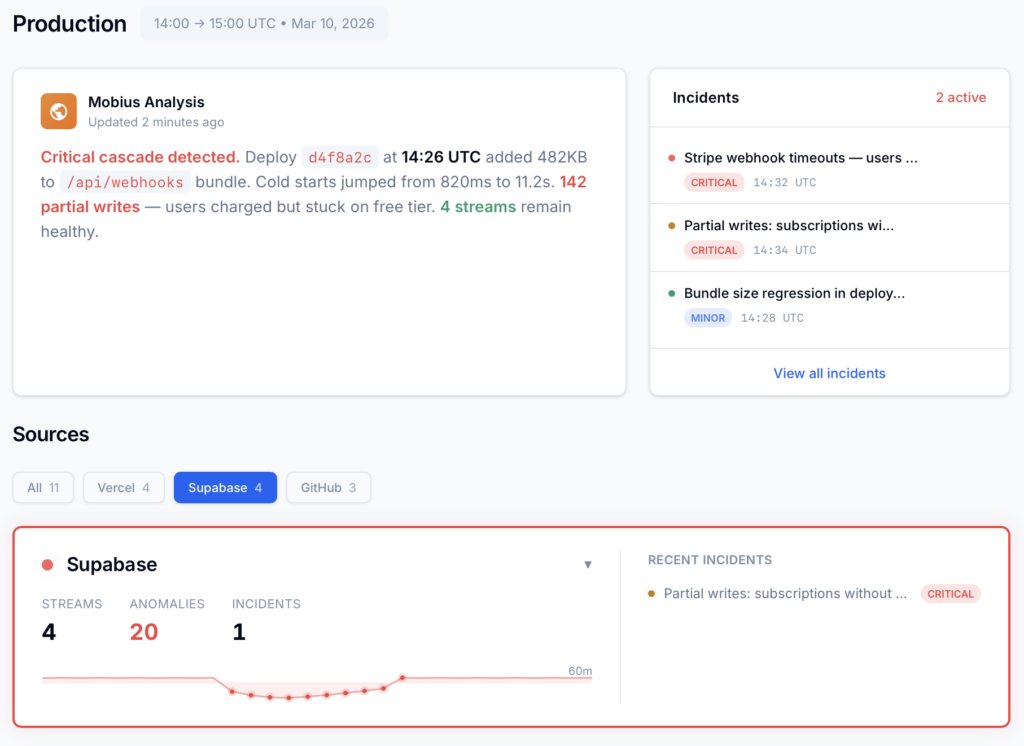
Connect your deployment chain. Surface emergent patterns. Get root cause analysis with fix recommendations — right in your editor.
? Intelligence that compounds — every runtime signal makes the next one sharper.
Dstl8 — Supabase runtime analysis
Open Source
Not ready for Dstl8? Start with Gonzo.
Free, open source log analysis TUI. Real-time charts, pattern detection, AI-powered insights — right in your terminal. No account, no config.
brew install gonzo
Ship AI-Generated Code. Debug It With Confidence.
Free account. Gonzo running against your production logs in 2 minutes. Early access to Dstl8. No credit card, no sales call.
Related pages
More for AI-generated code reliability.
AI Writes the Code.
Now Debug AI Code With Confidence.
Free, open source, terminal-native. Point it at your stack and get root cause in 2 minutes. No account, no config.