



Runtime Feedback for AI-SPEED ENGINEERING
AI is writing the code. Who’s watching the runtime?
Dstl8 is the runtime feedback platform for AI-speed engineering. It distills signal from noisy telemetry, reasons over it with our own fine-tuned model, feeds verified incident context back to your agents and engineers, and remembers what it learns.
Works with your stack







Runtime platforms and AI coding tools — connected in minutes. See all integrations →
The Runtime Context Gap
The faster AI ships code,
the less anyone understands what it’s doing.
01
Shipping complexity faster than anyone can follow
Every prompt ships a feature, not a function. More features, more moving parts, more emergent interactions. System complexity is outpacing understanding – and nobody in the room wrote the code.
# 7 PRs merged by Cursor in the last hour
2 new API routes, 1 dependency upgrade
● team members who reviewed
the runtime behavior:
— none —
02
Deployment chains you can set up but can’t debug
Vercel, Supabase, Railway – quick to configure, impossible to correlate when something breaks across them. Each platform has its own logs, its own schema, its own propagation delay. The stack is a black box assembled from other black boxes.
# same incident, three different surfaces
vercel: edge function timeout 11:00:01
supabase: RLS policy denial 11:00:04
railway: connection pool exhaust 11:00:07
→ no cross-source correlation out of the box
03
Every failure is a rabbit hole you didn’t earn
The developer didn’t write the code, didn’t configure the infra, didn’t choose the dependency. They have no mental model to start from. The knowledge tax is enormous – you need to know what to look for before you can look for it.
# monday morning incident response
1. open Vercel dashboard (which project?)
2. find the failing function (which route?)
3. read the error (what does this mean?)
4. check Supabase logs (different timestamp)
5. check Railway logs (different schema)
6. give up and ask the person who prompted it
→ they don’t remember either
— none —
// See how Dstl8 closes the gap.
THE DSTL8 RUNTIME FEEDBACK PLATFORM
04
Knowledge graph
Every resolved incident becomes institutional memory. What one team learns, every team keeps. Compounds for your organization, across services, over time. The layer that makes Dstl8 more valuable in year two than year one.
03
FEEDBACK LAYER
Streams verified runtime context into Claude Code, Cursor, Codex, and your existing tools. Infrastructure and config issues get a named fix. Application code issues get the root cause, with evidence, delivered to your agent with repo access.
02
Möbius reasoning
Our own fine-tuned model, orchestrated as multiple agents per workspace. Investigates, correlates, and reasons over distilled runtime evidence.
01
TELEMETRY DISTILLATION
Reads the content of every log line, not just its status code. Signal before spend.
Raw telemetry enters hot at the bottom. Verified context exits to your agents. What’s learned stays learned.
14 days free · Full platform access
Start Here
See what’s actually happening.
Connect your deployment chain. Surface emergent patterns. Get root cause analysis with fix recommendations — right in your editor.
↻ Intelligence that compounds — every runtime signal makes the next one sharper.
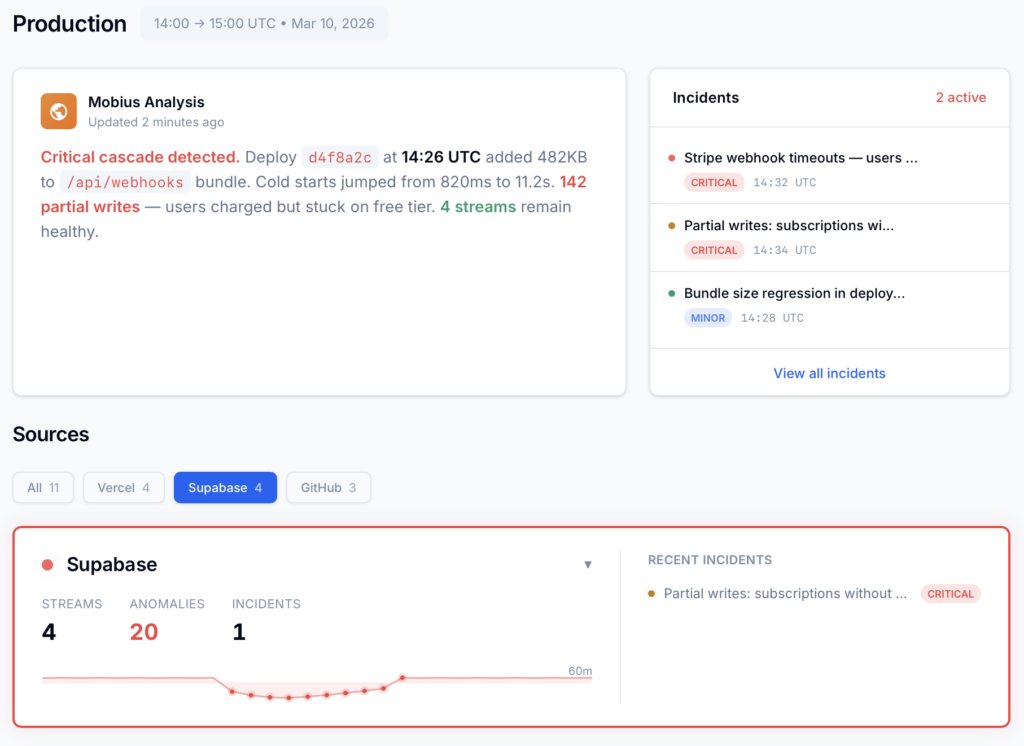
Dstl8 — Supabase runtime analysis

Open Source
Not ready for Dstl8? Start with Gonzo.
Free, open source log analysis TUI. Real-time charts, pattern detection, AI-powered insights — right in your terminal. No account, no config.
brew install gonzo
Why controltheory
Not another dashboard. A feedback loop.
Finds
Correlation
Debugging
Collection
AI code
Dev flow
Over time
Traditional monitoring
What you configured
Within one platform
Dashboard archaeology
Collect, pay for everything
Not designed for it
Context switch to dashboard
Same dashboards forever
ControlTheory
Unknown-unknowns
Across your deployment chain
Root cause with evidence
Distill only what you need
Built for it
Insights in your terminal
Intelligence that compounds
Get started
Install & Configure Dstl8 in Under 2 Minutes.
Try the Dstl8 CLI and TUI for continuous runtime feedback. Install it, add sources, connect the MCP server into Claude Code, and more.
brew install control-theory/dstl8/dstl8
dstl8 setup
curl -fsSL https://install.dstl8.ai/script/dstl8-cli | shnpx dstl8nix run github:control-theory/dstl8Download from https://github.com/control-theory/dstl8/releasesQuick Start
# 1. Install the CLI
brew install control-theory/dstl8/dstl8

# 2. Create a Dstl8 account (or `dstl8 login` if you already have one)
dstl8 setup

# 3. Add a source so logs flow in
dstl8 sources add vercel

# 4. Connect your AI agent, auto-detects MCP-compatible clients on your machine and configures them
dstl8 install --all
dstl8 install claude-code
Add Sources
# Add Sources

dstl8 sources add kubernetes
dstl8 sources add cloudwatch
dstl8 sources add vercel
dstl8 sources add supabase
dstl8 sources add otlp
dstl8 sources add github