



Open Source · Terminal Native
Gonzo
Real-time log analysis,
in your terminal.
An open-source terminal UI for real-time log analysis, inspired by k9s. Pipe in any log stream and get charts, heatmaps, pattern detection, and AI-powered insights without leaving your terminal. Press d and the same investigation opens in Dstl8.Lite, a local browser dashboard.
// Star us to stay updated!
MIT License
OTLP Ready
Dstl8.Lite Included
Built for AI Coders
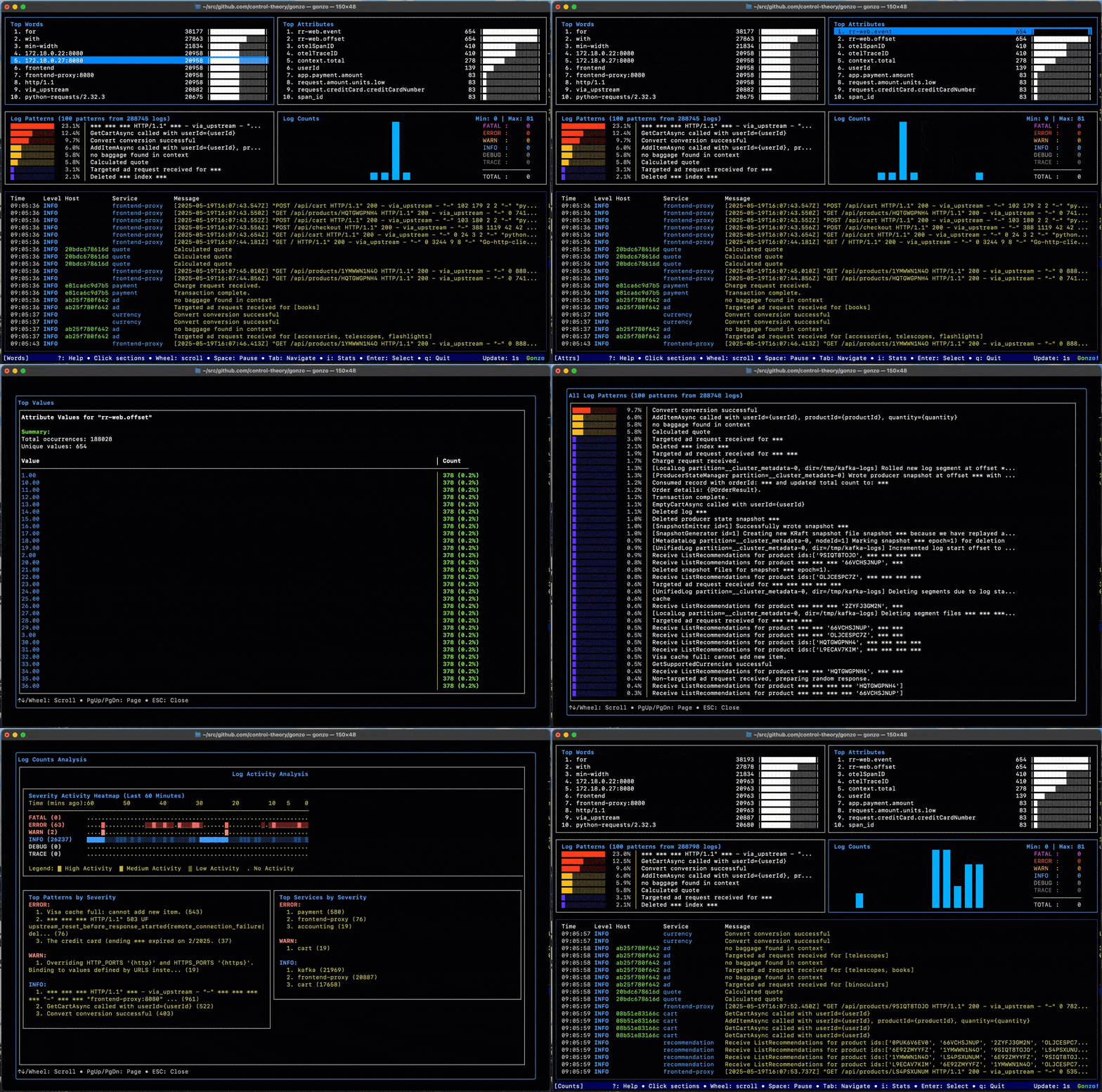
Works with the tools you already have
Pipe kubectl logs, tail CloudWatch, stream OTLP, or follow Loki in real time. See all integration examples →
Log Analysis for Live Investigation
AI writes the code.
Runtime decides if it works.
Code generation got 10x faster. Runtime visibility stayed at zero, so the bottleneck moved to debugging. Gonzo brings real-time log analysis into the terminal so you investigate while the failure is still happening, not reconstruct it from a dashboard afterward. Stream from Vercel, Supabase, Railway, Render, Kubernetes, OTLP, CloudWatch, Loki, or local files, then move from raw output to usable signal with top words, severity counts, heatmaps, and regex filtering. Read the full argument →
Key Features
Everything you need to
read the stream.
Real-time
Real-Time Analysis
Process logs as they arrive from files, stdin, or the network. Automatic detection for JSON, logfmt, and plain text, custom formats via YAML, and color-coded severity tracking.
k9s-inspired
Interactive Dashboard
A k9s-inspired 2×2 grid with real-time charts, vim-style and mouse navigation, a fullscreen log viewer, and 11+ themes including Dracula, Nord, and GitHub Light.
Precision
Advanced Filtering
Drill down faster with regex support, attribute search, an interactive severity filter, a column picker, and namespace/pod filtering in Kubernetes mode.
AI-powered
AI-Powered Insights
Pattern detection, anomaly analysis, and root cause suggestions on any log line. Works with OpenAI, Claude Code, Ollama, LM Studio, or fully offline. See the agent workflow ↓
Kubernetes
Kubernetes Native
Dashboard
Stream pod logs straight from your cluster with –-k8s-enabled, filter by namespace and label selector, or launch Gonzo from K9s with a single keystroke.
New
Dstl8.Lite Built In
Press d to open a local browser dashboard with workspaces, pattern detection, severity heatmaps, and live search. See how it works ↓
Open source · MIT License · No account required
See Gonzo in Action
From live stream
to root cause.
Prefer video? Watch the roadmap, pro tips, and live demo session →
Incident Triage
Find the failure while it’s happening
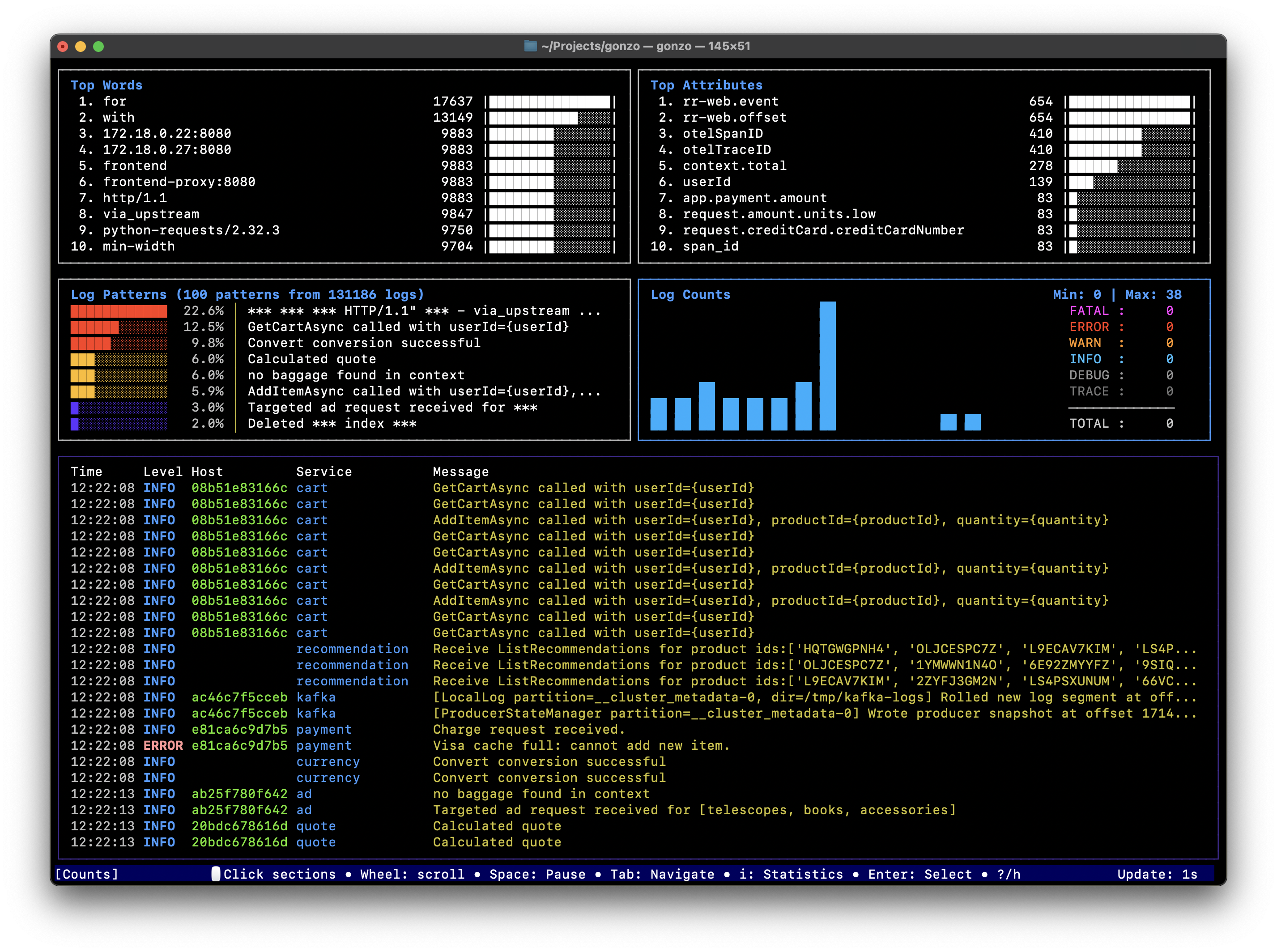
Pipe the crashing deployment’s logs in and the grid shows the error spike, the words driving it, and the raw lines behind it. Enter to drill in, / to filter, i to ask AI why.

Post-Deploy Check
Watch your AI-generated code hit production
Tail the stream right after you ship. A brand-new ERROR pattern or a severity shift minutes after a deploy is your rollback signal, before a user files the ticket.
Timeline Reconstruction
Pin down the minute it started
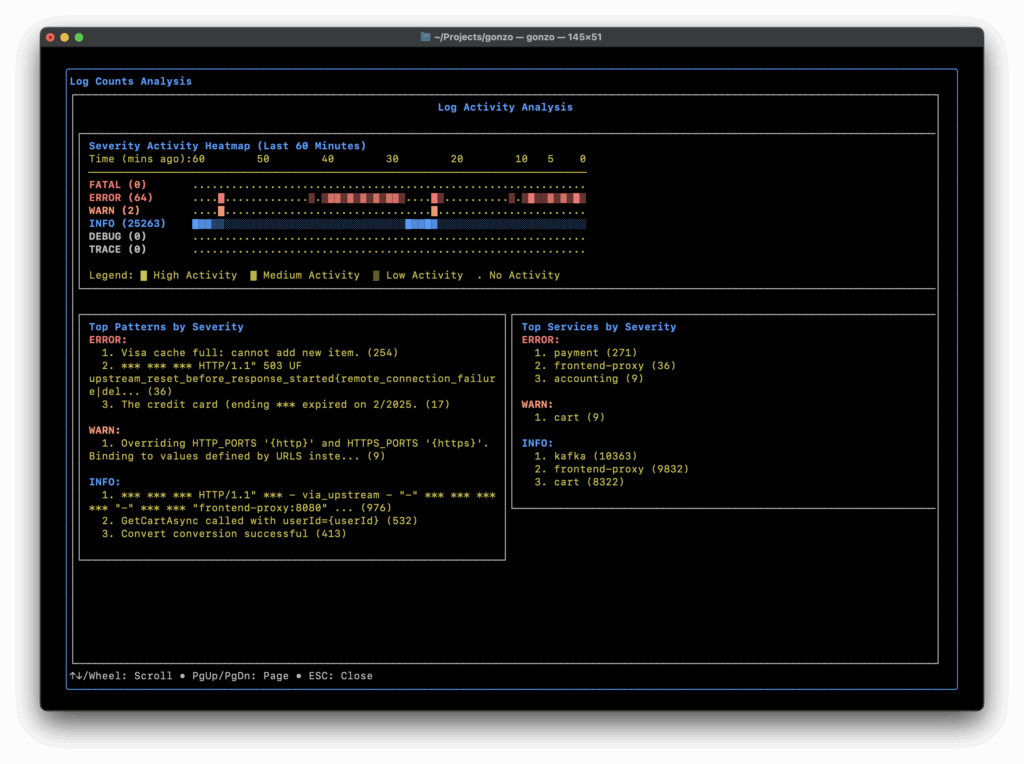
Time-bucketed heatmaps make bursts and periodic patterns obvious. Spot the exact minute a cascade began, filter to that window, and pull the raw lines to see what tipped it over.
Cross-Platform Correlation
Debug both sides of the request
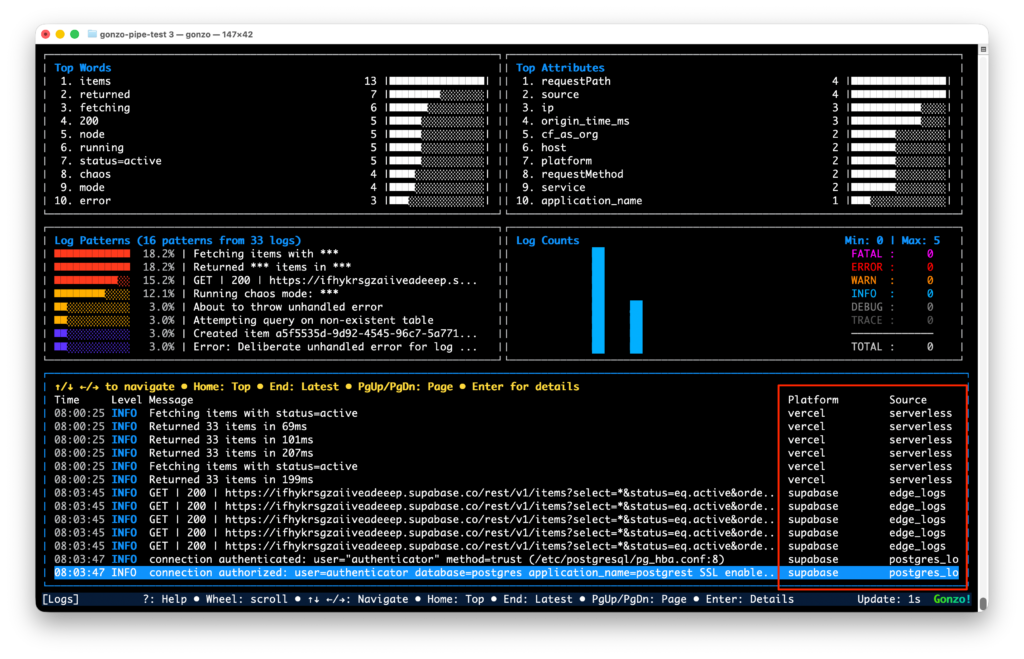
A request hits Vercel, calls Supabase, and dies somewhere in between. Merge both streams into one Gonzo session, tag each line by platform, and the Vercel error and the Postgres 42P01 sit side by side, correlated by timestamp. No alt-tabbing between two dashboards. See the full setup →
Agent-Native
Tell your agent
“tail my logs.”
Claude Code Skill
Setup is one sentence, not one afternoon
Install the Gonzo plugin in Claude Code and say “tail my Vercel logs.” The skill detects your deployment platform from project files and credentials, installs Gonzo if it’s missing, configures an AI provider, and generates the exact, tested pipe command with the right normalizers. No copy-pasting from six docs pages.
Works for Vercel, Supabase, Railway, Render, Fly.io, Cloudflare Workers, Netlify, CloudWatch, Kubernetes, Docker, and any command that writes to stdout.
Analyze
Instant analysis
Press i on any log line for an AI read: what the error means, likely root causes, and where to look next. No pasting stack traces into a chat window.
Interrogate
Chat with the evidence
Open a log’s detail view and press c to interrogate it in plain English: “why are auth failures spiking?” The AI answers from the buffer in front of you.
Switch
Any model, live
Swap models at runtime: OpenAI, Claude Code (uses your session, zero config), Gemini via a compatible endpoint, or fully offline with Ollama and LM Studio.
Listed on skills.sh · BYO model · Local models supported
New · Built Into Gonzo
Press d for
Dstl8.Lite.
One keystroke launches a local browser dashboard streaming the same logs Gonzo is analyzing. A bigger canvas for the same investigation, running entirely on your machine and powered by Gonzo under the hood.
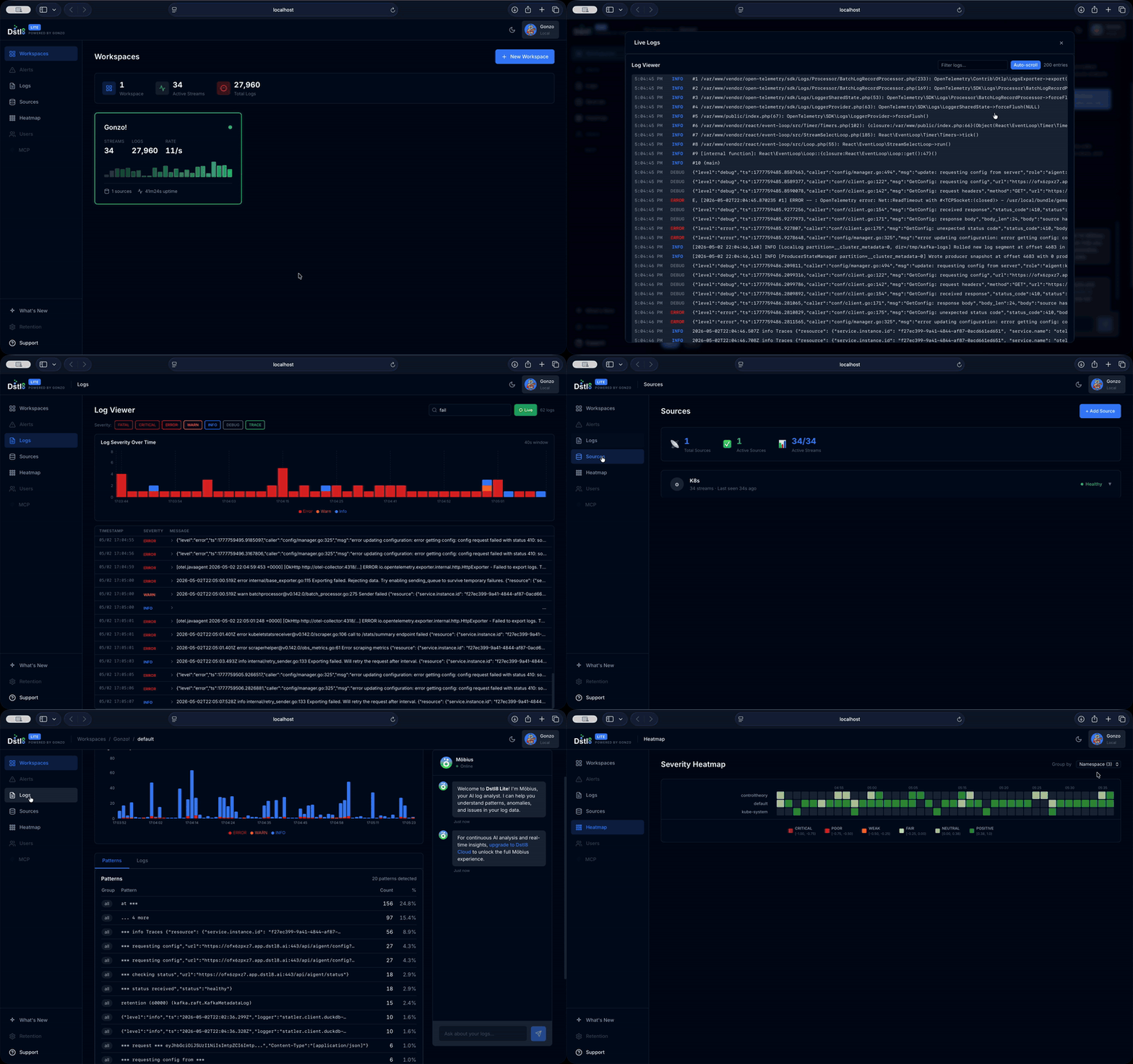
Workspaces
Every stream, one view
All active log streams with sparkline previews, plus per-stream severity breakdowns, top attributes, and a searchable live log viewer.
Patterns
Detection, not scrolling
Drain3-powered pattern detection classifies recurring log shapes as they arrive, so 10,000 lines collapse into the three that matter.
Heatmaps
Failure by dimension
Severity and sentiment heatmaps grouped by pod, namespace, service, host, or deployment. Spot which slice of the system is burning.
Local
In the binary. On your machine.
Served straight from the Gonzo binary over WebSocket. No account, no agent, no data leaving your laptop. Still free, still MIT.
From Gonzo to Dstl8
Investigate today.
Close the loop for good.
Gonzo works great while you’re watching. Most problems in AI-generated code don’t show up while you’re watching: they surface at 2am in staging, or in the preview deploy nobody checked. Dstl8 is the always-on layer, runtime signal from every environment flowing back to the people and agents writing the code.
01
Gonzo · live investigation in your terminal
Pipe any stream and read patterns in minutes. Open source, no config, no account. The fastest way to see what a running system is actually saying.
02
Dstl8.Lite · the same logs on a bigger canvas
Press d and your investigation moves to a local browser dashboard: workspaces, pattern detection, and heatmaps. Still local, still free, built into the binary.
03
Dstl8 · continuous runtime feedback for AI-generated code
Dstl8 connects Vercel, Supabase, Railway, AWS, Kubernetes, and OpenTelemetry, then distills every log into pure signal: patterns, sentiment, anomalies. Dstl8 reads the actual content of every log line, not just its status code. That runtime context streams into Claude Code, Cursor, and Codex, and Möbius agents watch whether you’re looking or not: pattern detection, anomaly alerts in Slack, and last night’s incident context waiting in your editor the next morning via MCP.
// free account · no credit card required · see pricing
How Gonzo is Different
Not another storage backend.
A live investigation layer.
| Traditional log tools | Gonzo | |
| Built for | Storage, dashboards, historical search | Live workflows & active investigation |
| Where you work | Browser-based UI | Terminal-native, in your flow |
| Sources | Locked to one platform | Pipe, tail, or OTLP from anywhere |
| Setup | Agents, config, onboarding | One pipe. No config, no account |
| Structure | Flatten OTLP into raw text | Preserve attributes & metadata |
| AI | Add-on, vendor-locked | BYO model: Claude, OpenAI, Ollama |
| Cost | Per-GB ingest & retention | Free & open source (MIT) |
“
I decided to give it a shot. It’s really nice! One of the things I always loved about Datadog’s log analysis tool was its ability to surface log patterns.
Engineer · Gonzo community
Quick Installation
Up and running in
one command.
Pick your path. Gonzo ships as a single binary. No daemon, no config file, no account.
Homebrew
macOS & Linux
Go Install
Requires Go 1.21+
Download Binary
Latest release for your platform
Build from Source
Clone & build it yourself
Nix
Beta support
Claude Code Plugin
Guided log-analysis skill, inside Claude Code
Quick Start
Start analyzing logs in seconds
Who Needs Gonzo?
Built for engineers debugging
real runtime failures.
</>
Developers
Stop context-switching between your IDE and a heavy observability UI. Gonzo streams granular runtime insight straight to your CLI so you trace production bugs without leaving flow state.
✧
Vibe Coders
Move fast without breaking production. Gonzo is a real-time sanity check for AI-generated logic, surfacing hidden runtime errors so you can iterate on prompts with a safety net.
⌘
AI-Native Teams
When code passes tests but fails at runtime, Gonzo helps in real time, so engineers spot runtime patterns before they turn into longer incidents.
▲
Terminal-First Teams
For Vercel, Supabase, and Railway teams that debug in the CLI and need faster function-level investigation without depending entirely on browser-based tooling.
⎈
Platform, SRE & DevOps
Server log analysis, infrastructure debugging, and live investigation across multiple services without switching between a dozen dashboards.
◎
OpenTelemetry Users
A practical option for structured log data analysis when OTLP logs need to be inspected quickly in a live stream, with attributes intact.
FAQs
Questions, answered.
What is Gonzo?
Gonzo is an open-source log analysis tool and terminal UI built for real-time log analysis. It helps engineers investigate live log streams, spot patterns, filter noise, and make sense of runtime failures across modern stacks like Vercel, Supabase, Railway, OpenTelemetry, and local application logs. It is a practical way to do log analysis before evidence disappears or gets buried across multiple tools.
How is Gonzo different from other log analysis tools?
Many log tools focus on storage, dashboards, and historical search. Gonzo focuses on live workflows. It’s a lightweight program for engineers who want fast terminal-based investigation, pattern discovery, and filtering across multiple log sources.
Does Gonzo work with OpenTelemetry?
Yes. Gonzo can receive OTLP logs directly, which makes it useful for structured log data analysis in OpenTelemetry-based environments. Teams can inspect live attributes and patterns in the terminal instead of flattening everything into raw text first.
Does Gonzo store historical logs?
No. Gonzo is built for live log analysis and active investigation, not long-term retention. It’s best used as a fast layer on top of the systems you already rely on for storage, collection, or retention.
What kind of log analysis is Gonzo’s primary function?
Gonzo is strongest for real-time, error, server, event, and structured log data analysis from modern systems. It can help with Kubernetes logs, OTLP logs, CloudWatch, Loki, Vercel, and local JSON streams as well.
Does Gonzo use AI for log analysis?
Optionally. Gonzo lets you send a selected log entry to Anthropic, OpenAI, Ollama, LM Studio, or a compatible API for explanation. It doesn’t claim autonomous diagnosis across your full stack; it helps you understand a specific log line faster.
What is Dstl8.Lite?
Dstl8.Lite is a local browser dashboard built into the Gonzo binary. Press d from any Gonzo view (or open localhost:5718) and the same logs Gonzo is analyzing stream into a richer UI with workspaces, pattern detection, severity heatmaps, and live search. It runs entirely on your machine: no account, and no data leaves your laptop.
What is How are Gonzo and Dstl8 related?
Gonzo and Dstl8.Lite are free, open-source tools for live, local investigation. Dstl8 is ControlTheory’s commercial product: continuous runtime feedback for AI-generated code. It connects Vercel, Supabase, Railway, AWS, Kubernetes, and OpenTelemetry, then streams runtime context into Claude Code, Cursor, and Codex. If Gonzo is how you read a stream today, Dstl8 is how that feedback runs continuously in production.
Learn More
Gonzo in the wild.
Start Reading Your Streams
Point Gonzo at a log stream and read patterns in minutes.
Open source. No config. No account. Install and pipe your first stream in under two minutes.