


Use Case · Keep Developers in Context
Keep Agents, Developers in Context. Close the Runtime Loop Inside Claude Code, Cursor, and Codex.
Runtime feedback belongs inside the tool that wrote the code. Dstl8 exposes your live incidents, patterns, and root cause narratives over MCP, plus a Claude Code Skill that teaches agents how to use them. Every prompt in Claude Code, Cursor, or Codex is grounded in what actually happened in production.
brew install control-theory/dstl8/dstl8
MCP + Skills
Two entry points
40+
Compatible agents
11
Platform integrations
0
Code changes required
What changed
The SDLC compressed. The feedback loop did not move with it.
AI coding tools compressed writing, testing, and shipping into a single session. What they did not compress is runtime. That gap is where this use case lives.
Closing the loop means putting runtime back where the code gets written, as structured evidence the agent itself can read.
TLDR
AI coding tools closed the loop from prompt to commit. Runtime is the loop that’s still open, and the developer is paying the tab-switch to close it.
How Dstl8 works
Four parts of Dstl8 that make this work.
01
MCP server plus a Skill, native to every MCP-capable agent
Dstl8 exposes your runtime signal as MCP tools and ships a companion Skill that teaches agents how to orchestrate them. MCP gives the agent the raw tools. The Skill gives it a playbook: how to triage, how to verify a deploy, how to correlate across environments. Both follow open standards, so the same integration works in Claude Code, Cursor, Codex, Gemini CLI, Windsurf, and 40+ other coding agents.
# Claude Code: MCP config
“mcpServers”: { “dstl8”: { … } }
# Plus the Skill, cross-agent
npx skills add control-theory/dstl8-skill
02
Structured incidents, patterns, anomalies, knowledge graph
Dstl8’s MCP surface is designed for LLMs to reason over, not for humans to scroll past. Agents can query live incidents, detected patterns, runtime anomalies, and a knowledge graph of resolved findings. Every response is structured data with cited evidence and relevant context, so the agent can act on it and attribute the fix.
# MCP surface exposed to agents
incidents · patterns · anomalies · knowledge graph
03
Möbius agents watching every environment continuously
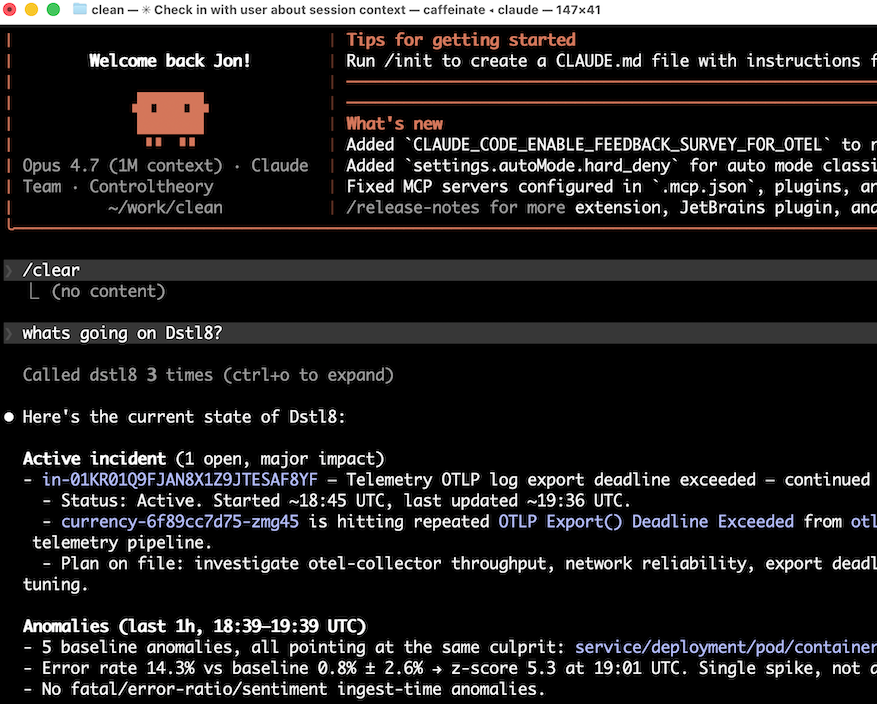
Möbius agents watch your runtime across local dev, staging, and production. They auto-detect incidents, write root cause narratives, and push alerts to Slack before a customer files a ticket. When an agent queries, it gets the same context a senior engineer would hand over in a standup.
04
Runtime signal from local dev through production
Vercel, Supabase, Railway, AWS CloudWatch, Kubernetes, OpenTelemetry, Netlify, Render, Fly.io, Cloudflare Workers, plus Gonzo forwarding for local dev. Cross-environment correlation from local to staging to production is first-class, not a special case. When your agent asks about runtime, it gets an answer that spans wherever the code is actually running.
TLDR
Runtime becomes structured data the agent reads directly. No plugin, no SDK, no dashboard tab.
Real world use case
One session, with and without the loop closed.
Without runtime context.
The developer pastes the error message. Claude Code reads the failing test, reads the source, proposes a fix. The fix handles the specific error shape in the pasted stack trace. It does not know that the same function is currently throwing three other error types in production for different reasons. The committed fix is shipped. The second error class resurfaces within the day.
With Dstl8 over MCP.
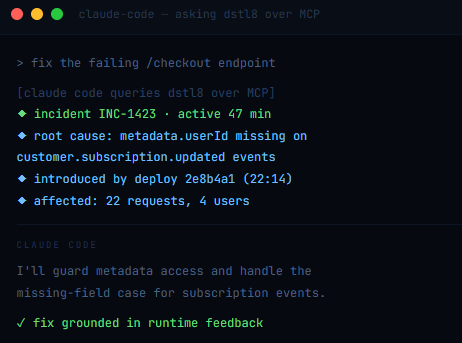
The developer says “fix the failing /checkout endpoint.” Claude Code queries Dstl8 first. Dstl8 returns INC-1423, names the real root cause (missing metadata.userId on specific Stripe event types), and includes the two correlated errors that share the same underlying assumption. The agent’s fix addresses the class, not the symptom. One commit. One deploy. The pattern closes.
Session type: agent-led bug fix · Runtime surface: Vercel + Stripe webhook
Outcome difference: two deploys → one deploy
TLDR
Runtime in the prompt produces one correct fix, not three iterative ones.
Why Dstl8?
Runtime built for agents, not dashboards.
Open Standards
Works in every agent that speaks MCP or Skills.
Claude Code, Cursor, Codex, Gemini CLI, Windsurf, GitHub Copilot, 40+ others. The MCP server and the Skill both follow open standards (agentskills.io), so the same integration works everywhere your team writes code. No per-agent plugin, no custom SDK.
Structured for LLMs
Not grep-able text.
Every MCP response is structured: incidents, patterns, anomalies, knowledge graph entries, root cause narratives. Agents reason over fields; they do not parse summaries.
Cross-Environment
Local → staging → production.
First-class, not a special case. Gonzo forwards local dev logs into the same knowledge graph that Dstl8 maintains for staging and production. One query, every environment.
Knowledge Graph
Findings persist across sessions, developers, and deploys.
When an incident gets resolved, the root cause, the evidence, and the fix land in the knowledge graph. A Claude Code session next week asking a similar question gets the known answer, not a cold-start diagnosis. The team’s runtime experience compounds instead of being rediscovered every time.
Learn more
Related pages for the tools and symptoms.
Dstl8’s MCP server and Skill are both agent-agnostic. These are the tool-specific pages and resources where in-context feedback loops are the core argument.
Common questions
What teams ask before adopting this.
Get started
Install & Configure Dstl8 in Under 2 Minutes.
Try the Dstl8 CLI and TUI for continuous runtime feedback. Install it, add sources, connect the MCP server into Claude Code, and more.
brew install control-theory/dstl8/dstl8
dstl8 signup
curl -fsSL https://install.dstl8.ai/script/dstl8-cli | shnpx dstl8nix run github:control-theory/dstl8Download from https://github.com/control-theory/dstl8/releasesQuick Start
# 1. Install the CLI
brew install control-theory/dstl8/dstl8

# 2. Create a Dstl8 account (or `dstl8 login` if you already have one)
dstl8 signup

# 3. Add a source so logs flow in
dstl8 sources add vercel

# 4. Connect your AI agent, auto-detects MCP-compatible clients on your machine and configures them
dstl8 install -all
dstl8 install claude-code
Add Sources
# Add Sources

dstl8 sources add kubernetes
dstl8 sources add cloudwatch
dstl8 sources add vercel
dstl8 sources add supabase
dstl8 sources add otlp
dstl8 sources add github
Start Here
See what’s actually happening.
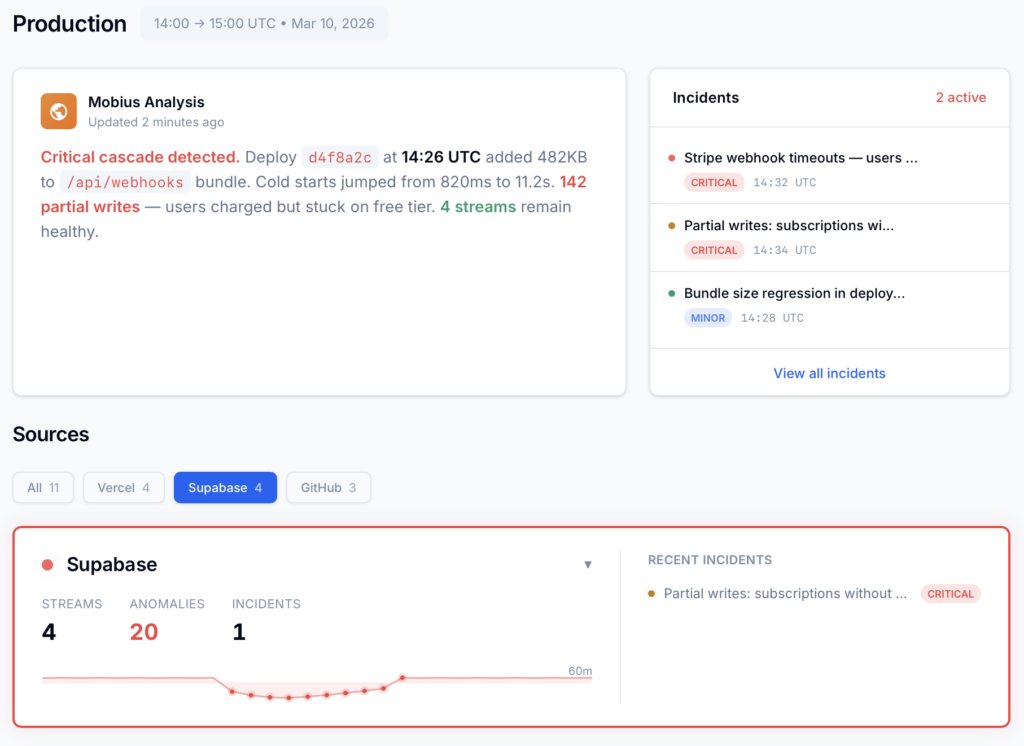
Connect your deployment chain. Surface emergent patterns. Get root cause analysis with fix recommendations — right in your editor.
↻ Intelligence that compounds — every runtime signal makes the next one sharper.
Dstl8 — Supabase runtime analysis

Open Source
Not ready for Dstl8? Start with Gonzo.
Free, open source log analysis TUI. Real-time charts, pattern detection, AI-powered insights — right in your terminal. No account, no config.
brew install gonzo
Close the Loop in Your Next Agent Session.
Free account. Connect the Dstl8 MCP server, install the Skill, or both. Every session after that runs with runtime feedback in the prompt.
Runtime belongs in the prompt.
Dstl8 closes the runtime feedback loop for every agent you run. MCP, Skill, or both. Every session grounded.