AI-Generated Code Breaks at Runtime. The Answer Is Hidden in Your Vibe Stack.
Cursor wrote it. Vercel runs it. Supabase stores it. Stripe processes it. When something breaks at runtime, each layer has its own failure signature, its own log format, its own retention window. Traditional debugging assumes you know which layer failed. With AI-generated code, you often don’t.
Five failure modes
Five Ways AI-Generated Code Breaks at Runtime.
The vibe stack moves fast. Cursor writes the code, Vercel deploys it, Supabase or Stripe sits underneath. When something breaks at runtime, the failure isn’t always where you’re looking. These five patterns are where AI-generated code goes wrong — and why they’re harder to find than bugs you wrote yourself.
The confidence gap. The model autocompletes with no uncertainty signal.
Cursor, Copilot, and every other AI coding tool generate code that looks correct. The autocomplete is confident. No warning when it’s extrapolating from thin context, no flag when the assumption only holds for the happy path. The code passes review because it looks like code that works. Tests pass because test data matches the happy path. It breaks in production because production has inputs the model never saw.
Happy path training bias. Production inputs are the edge case AI never saw.
AI coding tools train on code that works — examples from open source, documentation, tutorials, and codebases where the happy path is the common case. Your production traffic is different. Real users send malformed payloads. Third-party APIs return fields conditionally. Rate limits hit at scale. Database queries time out on real data volumes. The model confidently generates code for the examples it learned from. The failures happen on the inputs it never saw.
Missing context at generation time. The AI wrote it without knowing your runtime.
When Cursor generates a function, it doesn’t know whether that function will run in Vercel’s Edge Runtime or a Node.js Serverless Function. It doesn’t know your Supabase RLS policies. It doesn’t know which Stripe event types include which fields. It generates code that’s correct for the most common context it’s seen. If your actual runtime is different — a V8 isolate instead of Node.js, a service role instead of a user session — the mismatch surfaces at runtime, not at generation time.
Compounding layers. Cursor, Vercel, Supabase, Stripe — each hides differently.
Traditional debugging works when you know which layer failed. The vibe stack doesn’t narrow that down for you. A Stripe webhook returns 200 but your handler silently dropped the event. A Vercel function returns 500 but the logs are empty because the crash happened before your code ran. A Supabase query returns an empty array instead of an error because RLS is filtering instead of blocking. Each layer has its own failure signature. Correlating them manually — across different dashboards, different retention windows, different log formats — is where hours go.
The fix loop. Asking AI to fix the bug without runtime context ships a second failure.
The natural response to an AI-generated bug is to paste the error into Cursor and ask it to fix it. The problem: the fix is generated from the same context the original bug came from — the codebase, not the runtime. Without production data shapes, real event payloads, or the actual failure pattern across your log stream, Cursor fixes the symptom it can see. The underlying assumption that caused the failure is often still there, one step removed. The second failure arrives faster than the first, because now you’re confident the fix worked.
These failure modes aren’t bugs in Cursor or Vercel or Stripe. They’re a consequence of how the vibe stack is assembled: AI generates code without full runtime context, each platform abstracts its failure signatures differently, and the evidence that would explain the failure expires on different timelines across different dashboards. The debug problem isn’t finding the bug. It’s correlating signal across a stack that wasn’t designed to be correlated.
The solution
Surface the Pattern. Buried Deep in the Vibe Stack.
The five failure modes above are structural. They come with the stack. What changes is how fast you find the signal, debug it across layers, and fix the right thing — before your users know.
What you get
One Tool. Every Layer of Your Stack.
See what’s failing across your vibe stack — before it reaches your users.
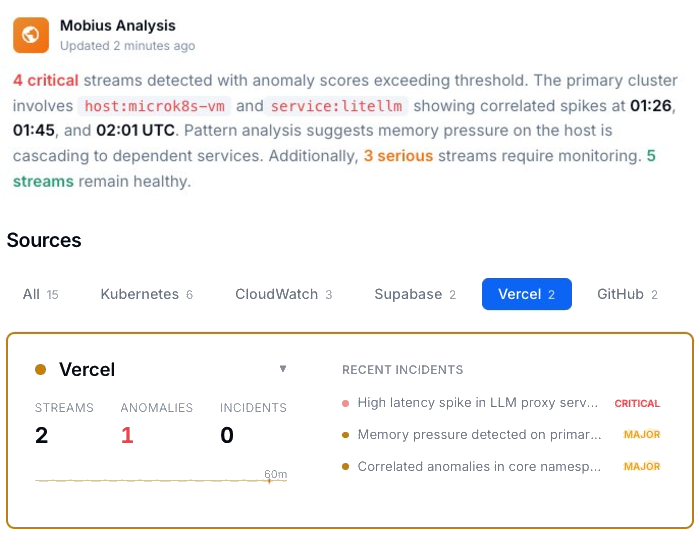
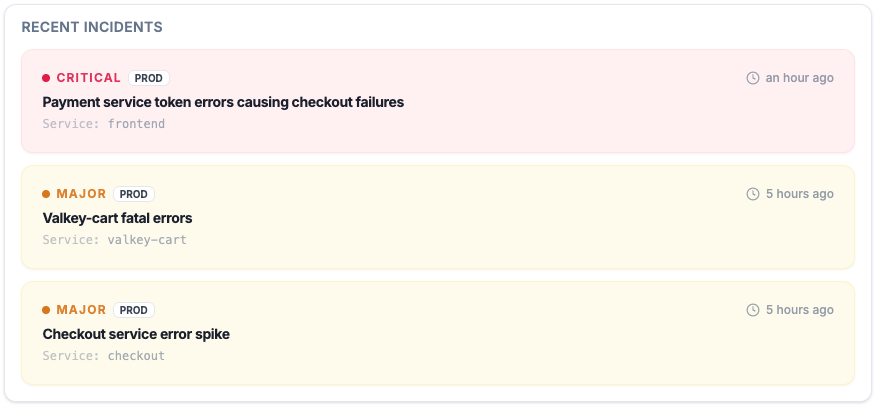
Every active incident, ranked by severity, with timestamps and source. Failures that span Cursor, Vercel, Supabase, and Stripe show up as correlated patterns, not isolated entries in four separate dashboards.
Same assumption. Second failure.
With AI-generated code, the fix loop makes it worse: patch the symptom without production context and the same assumption ships again. Feed real runtime data into the fix and you target the root cause the first time.
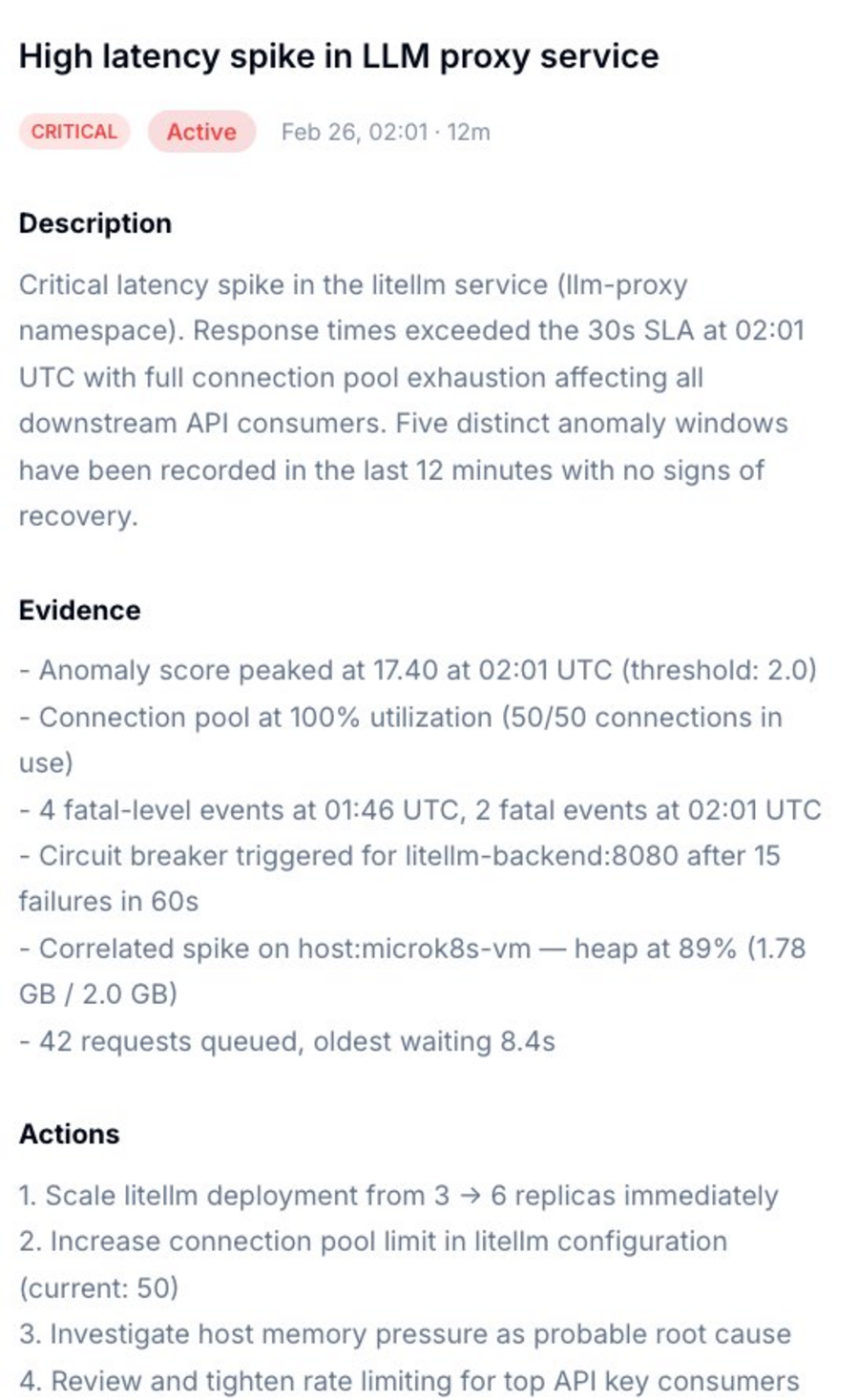
Not just what broke. Which layer, which assumption, what to do.
Dstl8 surfaces a diagnosis and suggests the fix. Description of what’s happening, evidence with specific data points, and a numbered action list. You’re reviewing a recommendation, not starting a cross-stack investigation.
Ask it which layer is hiding the answer.
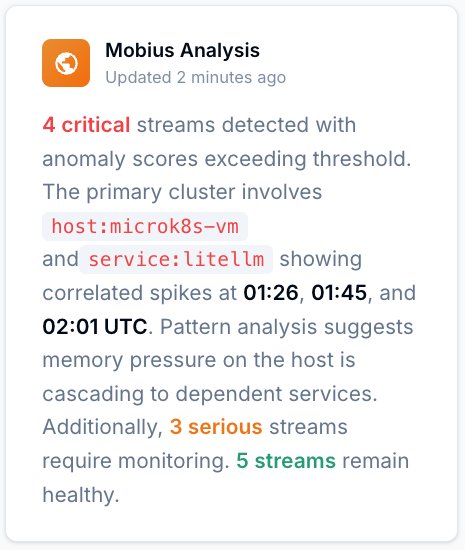
Natural language. Real answers from your actual data — not documentation. Mobius distills your log streams continuously, detects what’s anomalous across every layer, and tells you what to do next.
Start with Gonzo — free, open source, 2 minutes.
Pipe any log stream into Gonzo and pattern detection starts immediately. No dashboard, no config, no onboarding call. The fastest way to see what your vibe stack is actually doing.
AI-generated code debugging
How Teams Debug AI-Generated Runtime Failures.
| Capability | Without ControlTheory | With ControlTheory |
|---|---|---|
| Correlate failures across Vercel, Supabase, Stripe in one view | ✗ four dashboards | ✓ one stream |
| Detect repeating failure pattern before reading through entries | ✗ manual grep | ✓ pattern detection |
| Capture evidence before Vercel log window closes | ✗ dashboard only | ✓ real-time capture |
| Surface silent failures — empty array instead of error | ✗ invisible | ✓ pattern surfaced |
| Feed real production context back into Cursor for better fix | ✗ stack trace only | ✓ runtime context |
| Debug from Cursor’s integrated terminal without browser switch | ✗ browser required | ✓ terminal-native |
Common questions
AI-Generated Code at Runtime — Questions from Engineering Teams.
Why does AI-generated code work locally but break in production?
The most common cause is context mismatch at generation time. The AI generated the code without knowing your production runtime environment: which Vercel runtime the function targets, which Supabase RLS policies are active, which Stripe event types include which fields. Local development is a controlled environment where the happy path works. Production has real users, real data shapes, and real infrastructure behavior the model never saw. The second most common cause is training data bias: AI tools train on code that works, which means they optimize for the common case. Your production edge cases are the inputs those examples never covered.
How do I find which AI suggestion introduced a production bug?
A Git diff shows what changed. It doesn’t show when errors started, which users were affected, or whether the failure pattern existed before the deploy. Gonzo ingests your application logs and infrastructure events together, so you can see when the error first appeared and match it against what changed in the codebase. When an AI-generated assumption fails, the pattern surfaces in the log stream before you’ve finished reading the diff. Feed that pattern back into Cursor with the actual production event payload and you get a fix that targets the root cause, not the symptom.
What’s the most common runtime failure pattern in AI-generated code?
Silent drops — cases where the code handles an unexpected input by returning a success status or an empty result rather than an error. The Stripe webhook that returns 200 but never creates the order. The Supabase query that returns an empty array because RLS is filtering instead of blocking. The Vercel function that crashes during initialization and produces no runtime logs. These failures don’t trigger error alerts because they don’t throw errors. They show up as missing data, missed payments, or user complaints days later. Gonzo surfaces the absence of expected events — the webhook that should have produced a database write but didn’t — as a detectable pattern.
How is debugging AI-generated code different from debugging code I wrote?
With code you wrote, you understand the assumptions. You know what the function expects, what the third-party API returns, what the edge cases are — because you made those decisions. With AI-generated code, the assumptions are implicit in the model’s training data. You can read the code and it looks right, because it’s written correctly for the context the model assumed. The mismatch is between that assumed context and your actual runtime. That’s harder to find by reading the code, because the code isn’t wrong — the assumption is. Gonzo surfaces the failure pattern in production so you can identify which assumption failed, then feed that context back into the AI for a targeted fix.
Does ControlTheory work across my whole vibe stack?
Yes. Dstl8 was designed to distill and analyze all your logs — Vercel function logs, Supabase logs, application logs, infrastructure events, Kubernetes logs. And Gonzo can tail any log stream you can pipe to it right in your terminal. For teams running Cursor-generated code on Vercel with Supabase and Stripe underneath, you get correlated pattern detection across all four sources. Dstl8 extends this for teams: emergent pattern detection across multiple engineers’ services, so a failure class that one engineer hit last week shows up as a known pattern when a second engineer hits it this week.
Get started
Install Gonzo. Pipe Your Stack. See the Pattern.
Your Vibe Stack Breaks at Runtime.
Now You’ll Know Why.
Free account. Gonzo running against your stack in 2 minutes. Early access to Dstl8. No credit card, no sales call.
No credit card · no sales call · no drip sequence
Related pages