



Infrastructure · Vercel
Vercel Makes Deploying Invisible. That’s Also What Makes Debugging Hard.
One command, your AI-generated code is live, global, edge-distributed. No ops friction. But when something breaks, invisible deployment becomes invisible failure: logs delayed, evidence expiring, functions crashing before your code even runs.
brew install control-theory/dstl8/dstl8
Real incidesnt · Apr 10 2025 · Vercel Community
Silent 500 on POST /api/auth/login. Developer had added console.log at every Vercel layer — global middleware, route middleware, the controller. None fired. DB connection pool crashed during init — before the request handler ran. Logs appeared minutes later. On Hobby, they’d have been gone in an hour.
1
Log Retention on Hobby Plan
1 day
Log Retention on Pro — Then It’s Gone
0
Runtime Logs When Init Crashes
2 min
Time to First Insight with Dstl8
Zero
Config. Max Visibility.
Five failure modes
Five Ways Vercel Hides What’s Actually Breaking.
Vercel abstracts infrastructure so you can move fast. That abstraction doesn’t disappear when something breaks. It just makes the failure harder to see. These five failure modes are where AI-generated code on Vercel goes dark.
01
Your function crashed before your code ran. The logs are silent.
A database schema error. A missing environment variable. An initialization failure in the connection pool. When the crash happens during function startup — before the request handler is invoked — none of your console.log calls fire. The 500 reaches the browser. The runtime logs show nothing. You check every layer. Every layer is silent. That’s not a missing log statement. It’s a crash that happened before your code got control.
# Other requests around the same time — fully logged:
@@@@ GLOBAL LOGGER END (POS 0): GET /api/health-check – Status: 200 | Apr 10 12:30:00 PM EDT
@@@@ GLOBAL LOGGER END (POS 0): GET / – Status: 200 | Apr 10 12:38:40 PM EDT
# The failing request — completely absent from runtime logs:
POST /api/auth/login → 500 (no log output whatsoever)
02
The retention cliff. On Pro, it drops after one day.
Vercel runtime log retention is 1 hour on Hobby, 1 day on Pro, and 3 days on Enterprise. Extended 30-day retention requires Observability Plus — a paid add-on on top of Pro or Enterprise. That sounds like a billing detail. In practice it means: deploy on Monday morning, silent 500s begin, team notices user complaints by Tuesday evening — and the Monday morning logs are already gone. AI-generated code that fails quietly overnight won’t leave a trace by the time anyone thinks to look.
# Vercel runtime log retention (verified Feb 2026)
Hobby 1 hour
Pro 1 day
Enterprise 3 days
Pro/Ent + Obs. Plus 30 days ← paid add-on
# Deploy: Monday 09:00
# First complaint: Tuesday 18:00
# Monday logs: gone.
# You know something broke Monday.
# The window closed Tuesday morning.
03
The CLI blind spot — logs exist, but your terminal can’t reach them.
vercel logs shows live output only. Historical logs exist in the web dashboard within the retention window — but they’re unreachable from the terminal. For engineers debugging inside Cursor or Claude Code, that’s the only interface that matters. The logs from 20 minutes ago that would explain the failure are sitting in a browser tab you’d have to open separately, copy from, and paste into your editor. That context switch breaks the flow that AI coding tools are built around — and the logs are gone before the next sprint anyway.
# In Cursor’s integrated terminal, post-deploy
$ vercel logs my-app
Streaming live logs… (press Ctrl+C to stop)
# No –since flag. No –from. No range queries.
# Historical logs: dashboard only.
# Terminal: live output or nothing.
# The failure happened 18 minutes ago.
# Your terminal can’t see it.
# Your dashboard can — for now.
04
AI-generated code assumes Node.js. Edge Runtime is not Node.js.
Cursor, Copilot, and every AI coding tool trains on Node.js patterns. Edge Runtime is a V8 isolate — it doesn’t have fs, Buffer is partial, crypto behaves differently, some npm packages don’t run at all. AI-generated code doesn’t know which runtime your function targets. It autocompletes against the full Node.js API surface. When an API that doesn’t exist in Edge Runtime gets called in production, the failure is often silent — an unhandled rejection, a 500 with no clear log — because the error happens in infrastructure before your error handlers have a chance to catch it.
# AI generated · assumes Node.js
import { readFileSync } from ‘fs’ // ✗ not in Edge Runtime
const hash = crypto.createHmac(…) // ✗ partial in Edge Runtime
Buffer.from(data, ‘base64’) // ✗ limited in Edge Runtime
# Works in local dev (Node.js)
# Works in Vercel Serverless Functions
# Fails silently in Edge Middleware
# Error: module not found
# Or: silent 500. No stack trace.
05
Log latency creates a false “nothing happened” signal at exactly the wrong moment.
Vercel log delivery is not uniform. Some entries appear instantly. Others lag by minutes. During an active incident — when you’re watching logs in real time, trying to confirm whether a fix worked — that latency creates a window where it looks like no errors are occurring. You redeploy. You test. The logs look clean. Two minutes later the error entries from before the fix arrive. The signal you needed during triage was there. It just wasn’t there yet.
# 14:22:00 · redeployed · watching logs
14:22:04 GET /api/health 200 ✓
14:22:09 GET / 200 ✓sws
14:22:15 (no errors) ← looks fixed
# 2 minutes later — delayed entries arrive:
14:21:58 POST /api/auth/login 500 ERROR
14:22:01 POST /api/auth/login 500 ERROR
14:22:11 POST /api/auth/login 500 ERROR
# Not fixed. Still broken.
# The latency window cost 2 minutes of triage.
Why should you care?
Vercel’s abstractions are the product. The invisible deployment, the managed edge network, the zero-ops serverless runtime — that’s what you’re paying for. It’s not going to change. The retention cliff, the CLI blind spot, the silent pre-handler crash — these are structural properties of the platform, not bugs on the roadmap. The faster you ship AI-generated code on Vercel, the more often you’ll hit them.
The solution
How Vercel Teams Debug AI-Generated Code Fast.
The four failure modes above are structural. They come with the platform. What changes is how fast you find the signal, reconstruct what happened, and fix it for good before the log window closes.
Catch the pattern before the log window closes
Dstl8 distills your Vercel log streams in real time and surfaces patterns by severity and frequency — so you’re not waiting for a support ticket to tell you something is wrong. If a failure class is emerging, you see it while the evidence still exists.
Reconstruct what happened when the logs were silent
When your function crashes before the handler runs, the runtime logs are empty — but infrastructure events aren’t. Dstl8 ingests both streams together, so a DB connection failure during init shows up as a pattern in the surrounding signal even when your application logs have nothing.
Know whether the fix actually worked — not just whether the logs look clean
Log latency means a clean-looking log stream isn’t confirmation the fix worked. Dstl8 surfaces error pattern counts and severity trends over time — so you’re comparing actual rates, not reacting to a 2-minute latency window that looks like silence.
Localize platform failures vs. code failures before you start editing
Edge Runtime rejections, cold start timeouts, DB pool exhaustion — these are platform-layer failures that look identical to code bugs in the surface logs. Dstl8’s heat map and severity distribution show where the volume is concentrated so you know where to look before you touch the codebase.
When the pattern spans multiple functions, someone notices
The same Edge Runtime assumption failure appearing across multiple services built by different engineers isn’t coincidence — it’s a signal that the AI tooling your team is using has a systematic blind spot. Dstl8 is built for that moment: emergent cross-service pattern detection before the first P0.
What you get
How Vercel Teams Catch Silent Failures Before the Log Window Closes.
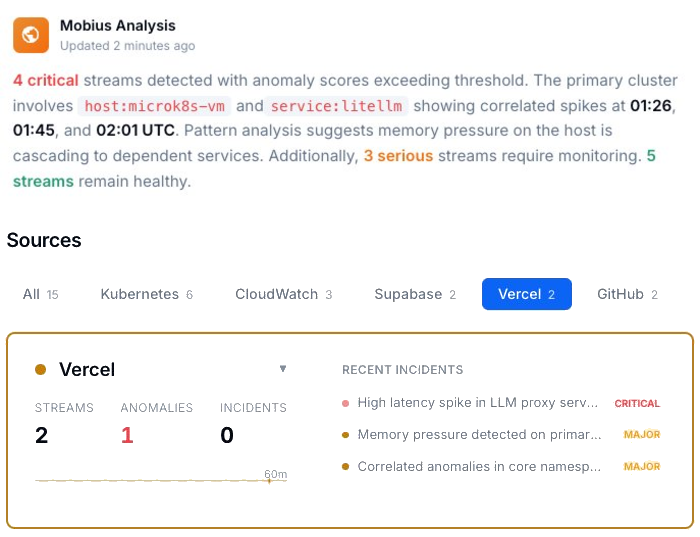
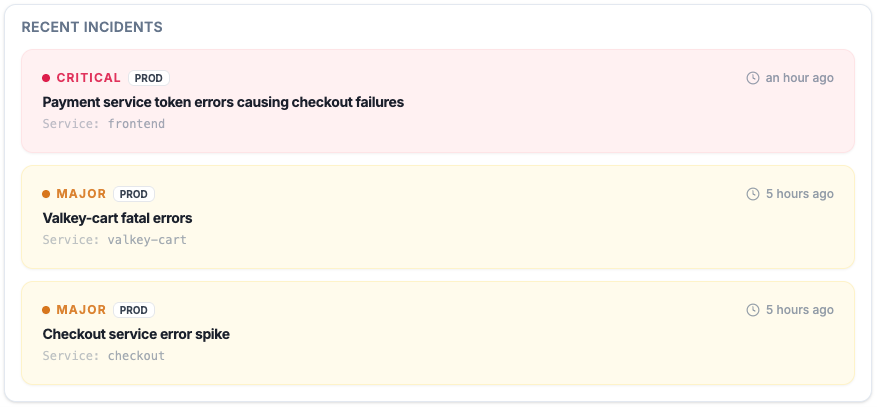
Active Incidents
See what’s critical, what’s major, and what’s already cascading — before the 1-day window expires.
Every active incident, ranked by severity, with timestamps and source. Not a log dump — a prioritized list of what needs attention right now, while the evidence still exists.
The Log Window Problem
Evidence that expires fast.
1 hr Hobby · 1 day Pro · 3 days Enterprise
Deploy Monday morning. Silent 500s start. Team notices Tuesday evening. The Monday logs are already gone — Pro retention is 1 day. 30-day retention requires Observability Plus, a paid add-on. Without it, the evidence window is narrower than most teams’ incident response time.
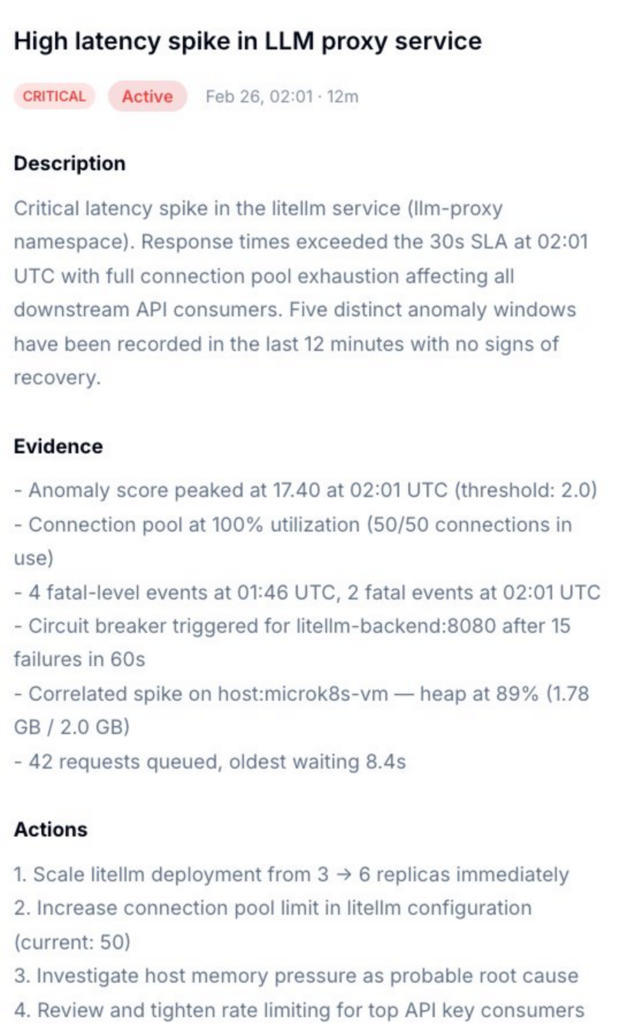
Incident Detail
Not just what broke. What caused it, and exactly what to do.
Dstl8 surfaces a diagnosis and suggests the fix. Description of what’s happening, evidence with specific data points, and a numbered action list. You’re reviewing a recommendation, not starting an investigation into silent logs.
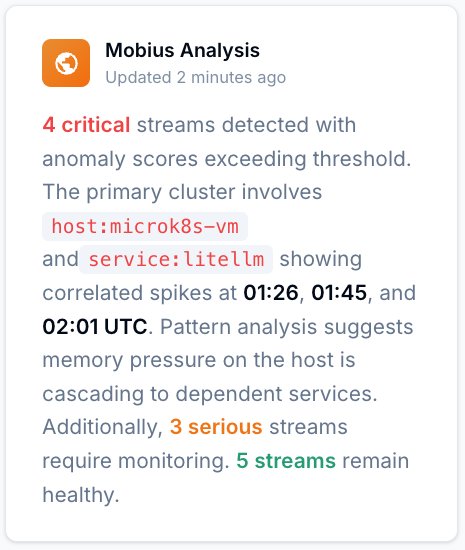
Mobius
Ask it anything about your Vercel log stream.
Natural language. Real answers from your actual data — not documentation. Mobius is Dstl8’s AI. It distills your log streams continuously, detects what’s anomalous, and tells you what to do next. Including what happened before you noticed.
Get Started
Try Gonzo — free, open source, 2 minutes.
2K+ GitHub stars
Pipe your Vercel log stream directly into Gonzo. Pattern detection, severity filtering, and AI explanation — all in your terminal. No account, no config, no agent. The fastest way to see what your Vercel functions are actually doing.
Vercel log analysis
Debugging AI-Generated Code on Vercel: Your Options.
Capability
Silent 500s caught before users report them
Reconstruct failures after log window closes
Diagnosis with suggested actions
Localize platform vs. code failure
Confirm fix without log latency confusion
Cross-service pattern detection
Time to first insight
Manual
Hours
AI Coding Teams Today
Prompt by prompt
ControlTheory
2 minutes
Common questions
Vercel Log Analysis — Questions from Engineering Teams.
Get started
Install & Configure Dstl8 in Under 2 Minutes.
Try the Dstl8 CLI and TUI for continuous runtime feedback. Install it, add sources, connect the MCP server into Claude Code, and more.
brew install control-theory/dstl8/dstl8
dstl8 signup
curl -fsSL https://install.dstl8.ai/script/dstl8-cli | shnpx dstl8nix run github:control-theory/dstl8Download from https://github.com/control-theory/dstl8/releasesQuick Start
# 1. Install the CLI
brew install control-theory/dstl8/dstl8

# 2. Create a Dstl8 account (or `dstl8 login` if you already have one)
dstl8 signup

# 3. Add a source so logs flow in
dstl8 sources add vercel

# 4. Connect your AI agent, auto-detects MCP-compatible clients on your machine and configures them
dstl8 install --all
dstl8 install claude-code
Add Sources
# Add Sources

dstl8 sources add kubernetes
dstl8 sources add cloudwatch
dstl8 sources add vercel
dstl8 sources add supabase
dstl8 sources add otlp
dstl8 sources add github
Start Here
See what’s actually happening.
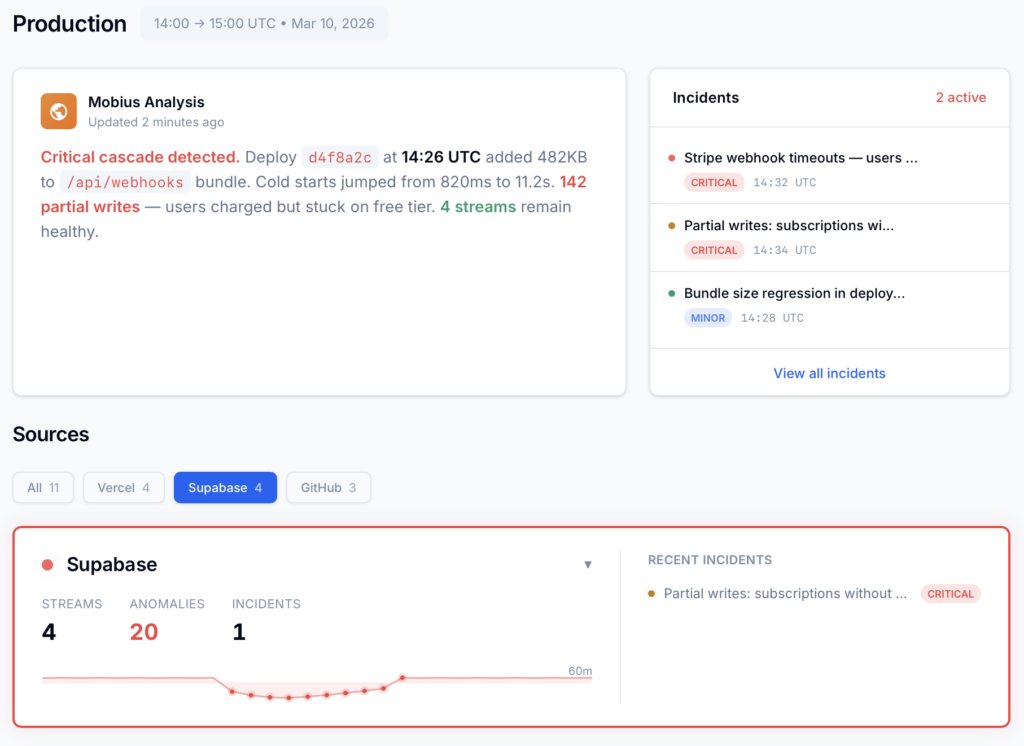
Connect your deployment chain. Surface emergent patterns. Get root cause analysis with fix recommendations — right in your editor.
↻ Intelligence that compounds — every runtime signal makes the next one sharper.
Dstl8 — Supabase runtime analysis

Open Source
Not ready for Dstl8? Start with Gonzo.
Free, open source log analysis TUI. Real-time charts, pattern detection, AI-powered insights — right in your terminal. No account, no config.
brew install gonzo
Vercel deploys it. You run it with confidence.
Free account. Dstl8 tracks Vercel and Supabase log streams (and more) in 2 minutes. No credit card, no sales call.
Related pages
More for the Vibe Stack.
Vercel Makes Deploying Invisible.
Don’t Let Debugging Be Invisible Too.
Free, open source, terminal-native. Pipe your Vercel log stream in 2 minutes. No account, no config.