



MCP · AI Agents
AI Agents Code Blind to Production. MCP Server Tools Fix That.
Claude Code, Cursor, and Codex write against patterns and the files in context — not what your running system actually did. Dstl8’s MCP server tools feed your agent live runtime data over the Model Context Protocol, with root cause cited to the exact log line, so the next fix is grounded in production reality, not a guess.
brew install control-theory/dstl8/dstl8
2 min
From Install to Agent Connected
4+
MCP-Compatible Agents Supported
50+
Runtime Sources Behind the Server
1
Log Line Each Root Cause Cites
Zero
Logs to Paste Into Chat
Four failure modes
Four Ways AI Agents Go Wrong Without Runtime Context.
AI agents are powerful at writing code and weak at knowing what your running system did. Without a live feed from production, even a good agent optimizes for plausible, not correct.
01
Your agent suggests fixes for the wrong root cause
It reasons from the diff and the files in context, not from what production did. So it confidently patches a symptom while the real failure sits one layer away in auth, config, or data.
# agent reads the diff
suggests: retry(push, 3)
# real cause, one layer away
token scope missing in prod
patch ships · incident persists
02
Copy-pasting logs into chat is lossy and stops scaling
You hand the agent a snippet, it loses the surrounding correlation, and the moment the incident spans services the context gap reopens — usually mid-investigation.
# you paste 40 log lines
agent: looks like a 500
# the upstream trace
not in the snippet
root cause: out of context
03
Without a live feed, the agent’s mental model drifts
Every deploy ships behavior nobody reviewed. With each AI-generated change, the agent’s picture of your system gets staler than the system itself.
# agent assumes schema v1
prod migrated to v2 last deploy
# generated query
column not found
04
Hallucinated APIs and config look plausible until runtime
The agent invents a method or env var that fits the pattern but not your system. It compiles, it passes the vibe check, and it 500s on the first real request.
# agent-generated call
client.fetchAllUsers()
# method does not exist
TypeError at runtime
Why should you care?
AI agents are only as good as their context. Give them the diff and they guess; give them what production actually did and they reason. MCP server tools are how that runtime truth reaches the agent loop.
The solution
How Dstl8’s MCP Server Grounds Your Agent in Reality.
The goal is not to slow your agent down. It is to give it the one thing it lacks — a live, correlated view of what your running system actually did — so the code it writes next is grounded in evidence.
Give your agent what production actually did
The MCP server exposes real runtime signal — failures, regressions, and correlations — so your agent reasons from evidence instead of patterns in the diff.
One command to connect any MCP client
dstl8 install –all auto-detects Claude Code, Cursor, Codex, and Copilot on your machine and wires them up. No config files to hand-edit.
Root cause cited to the log line, inside the agent loop
The agent gets the answer with its evidence attached, so the fix it proposes is anchored to the actual incident, not a plausible guess.
50+ runtime sources behind one server
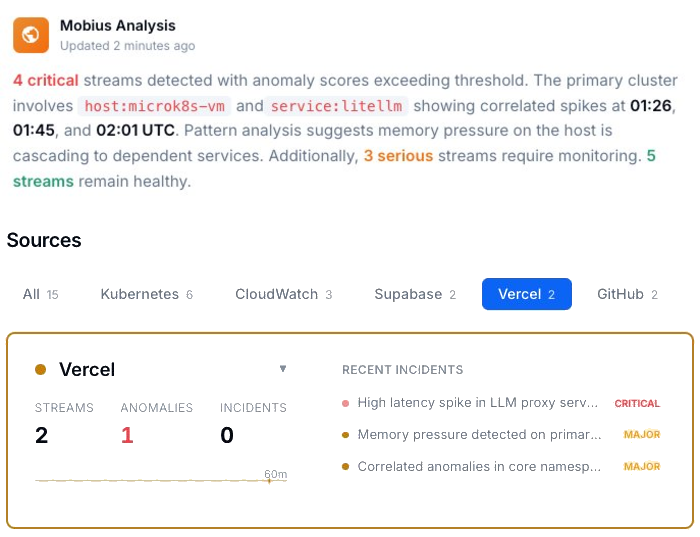
Vercel, Supabase, Kubernetes, AWS, OpenTelemetry and more feed the MCP server, so the agent sees the whole stack through one connection.
Structured context instead of pasted snippets
Möbius distills the runtime into context the agent can actually use, replacing lossy copy-paste with a live, correlated feed.
What you get
What Runtime Context for Your Agent Looks Like.
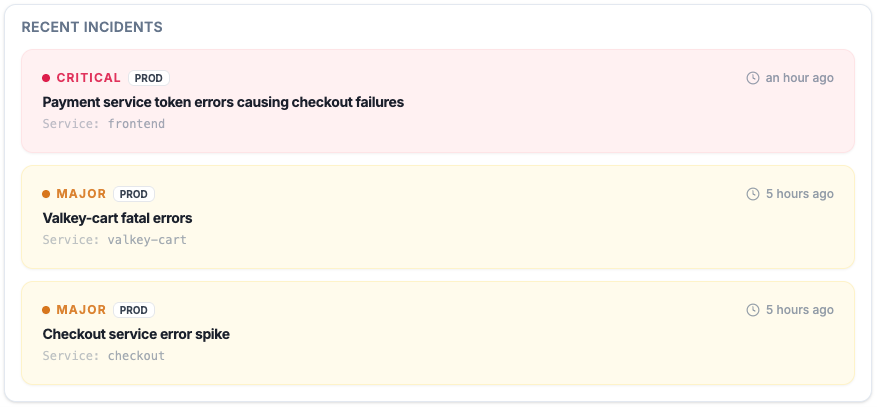
Active Incidents
See which AI-generated failures are real, which are noisy, and which are spreading.
Instead of digging through scattered logs when an agent-written change breaks, you get a prioritized incident view with timestamps, severity, and evidence connected to the runtime.
Code Quality
Improve code quality without slowing down authorship.
24.2% JavaScript snippets affected in one security study
AI-assisted output can be productive and still carry security and reliability debt. Code quality assurance starts after generation, not before it.
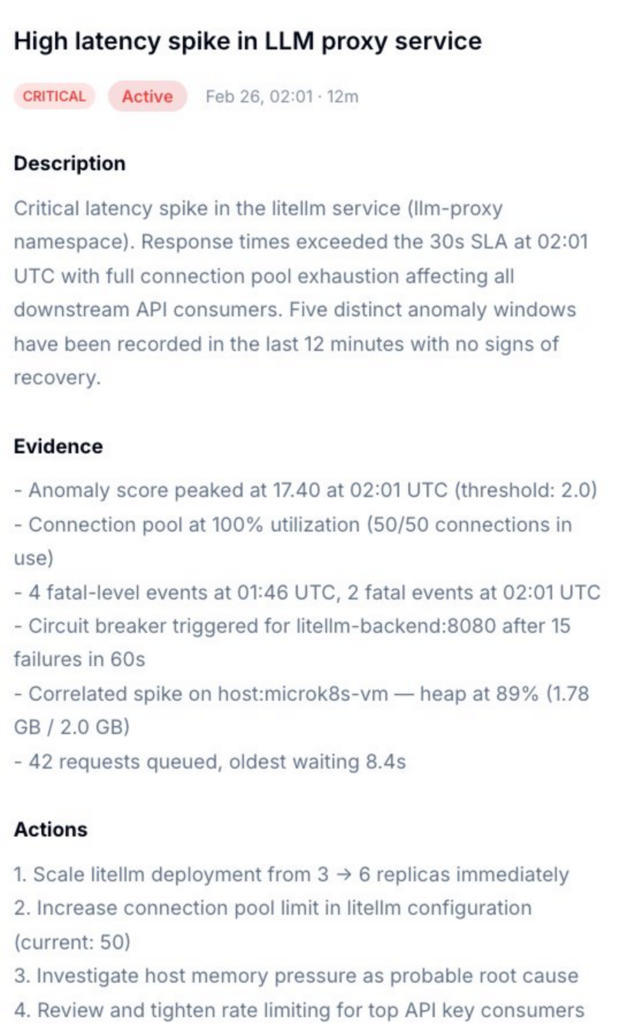
Incident Detail
Root cause, evidence, and next actions in one place.
Get a diagnosis that tells you whether the failure belongs to auth, data shape, environment drift, missing publish artifact, or an actual code path regression from GitHub Copilot code.
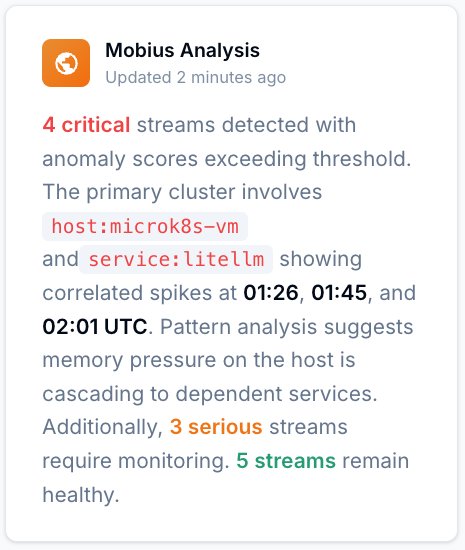
Mobius
Ask what changed, what broke, and what is correlated.
Natural language over real telemetry. Use it to investigate agent-written code, MCP-connected services, or legacy code touched by AI suggestions without starting from a blank terminal.
Get Started
Start with Gonzo — free, open source, 2 minutes.
2K+ GitHub stars
Use Gonzo to inspect what your AI-generated code is doing in production before you ask for another fix, another review, or another autocomplete.
Context your agent can use
Giving Your AI Agent Runtime Context: Your Options.
Capability
Live runtime data, not pasted snippets
One command to connect Claude Code, Cursor, Codex
Root cause cited to the log line in the agent loop
50+ runtime sources behind one MCP server
Structured, correlated context, not raw logs
Time to first insight
Copy-Paste Logs
Hours
Generic MCP Server
Prompt by prompt
ControlTheory
2 minutes
Common questions
MCP Server Tools — Questions from Engineering Teams.
Get started
Install & Configure Dstl8 in Under 2 Minutes.
Try the Dstl8 CLI and TUI for continuous runtime feedback. Install it, add sources, connect the MCP server into Claude Code, and more.
brew install control-theory/dstl8/dstl8
dstl8 signup
curl -fsSL https://install.dstl8.ai/script/dstl8-cli | shnpx dstl8nix run github:control-theory/dstl8Download from https://github.com/control-theory/dstl8/releasesQuick Start
# 1. Install the CLI
brew install control-theory/dstl8/dstl8

# 2. Create a Dstl8 account (or `dstl8 login` if you already have one)
dstl8 signup

# 3. Add a source so logs flow in
dstl8 sources add vercel

# 4. Connect your AI agent, auto-detects MCP-compatible clients on your machine and configures them
dstl8 install --all
dstl8 install claude-code
Add Sources
# Add Sources

dstl8 sources add kubernetes
dstl8 sources add cloudwatch
dstl8 sources add vercel
dstl8 sources add supabase
dstl8 sources add otlp
dstl8 sources add github
Start Here

See what’s actually happening.
Connect your deployment chain. Surface emergent patterns. Get root cause analysis with fix recommendations — right in your editor.
? Intelligence that compounds — every runtime signal makes the next one sharper.
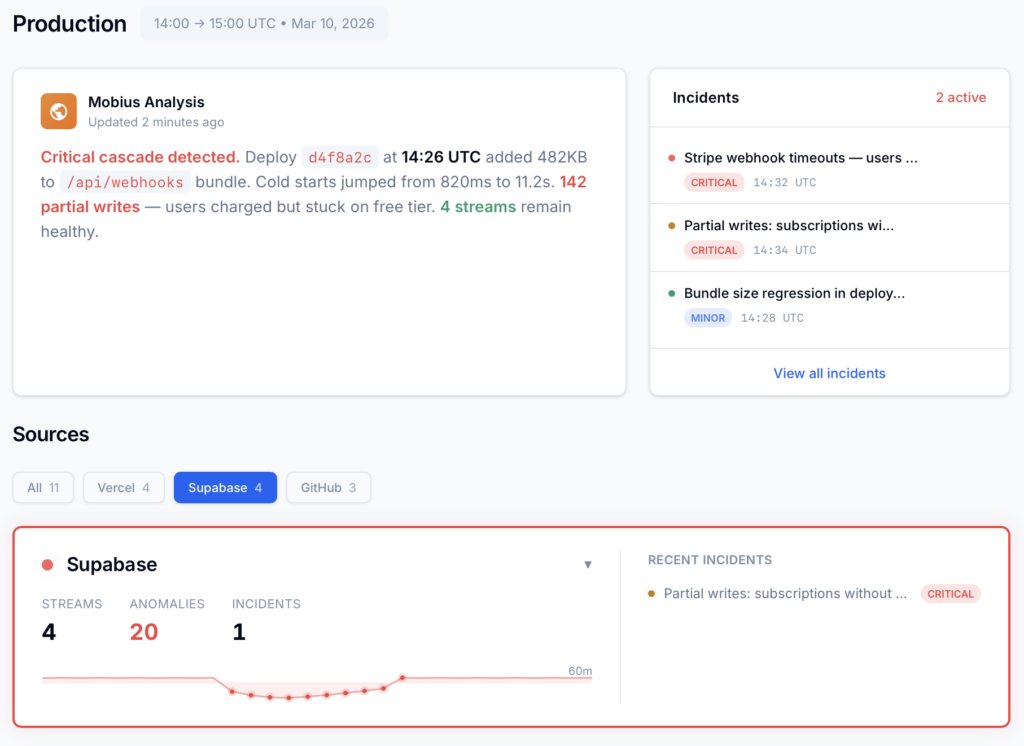
Dstl8 — Supabase runtime analysis

Open Source
Not ready for Dstl8? Start with Gonzo.
Free, open source log analysis TUI. Real-time charts, pattern detection, AI-powered insights — right in your terminal. No account, no config.
brew install gonzo
Give Your Agent Production Reality.
Free account. Gonzo running against your production logs in 2 minutes. Early access to Dstl8. No credit card, no sales call.
Related pages
More on connecting AI agents to runtime.
Your Agent Writes With Confidence.
Now Ground It in Reality.
One command connects Claude Code, Cursor, and Codex to live runtime data. Free 14-day trial, no credit card.