



Databases · Auth · Edge Functions · Supabase
Supabase Log Analysis — Decode RLS Errors and Edge Function Failures.
Supabase ships fast. Debugging does not. RLS denials, Storage policy failures, Auth problems, and Edge Function errors land in different log surfaces with different schemas and different delays. Pull them into one stream, correlate them across services, and find the actual root cause before the next support ticket arrives.
brew install control-theory/dstl8/dstl8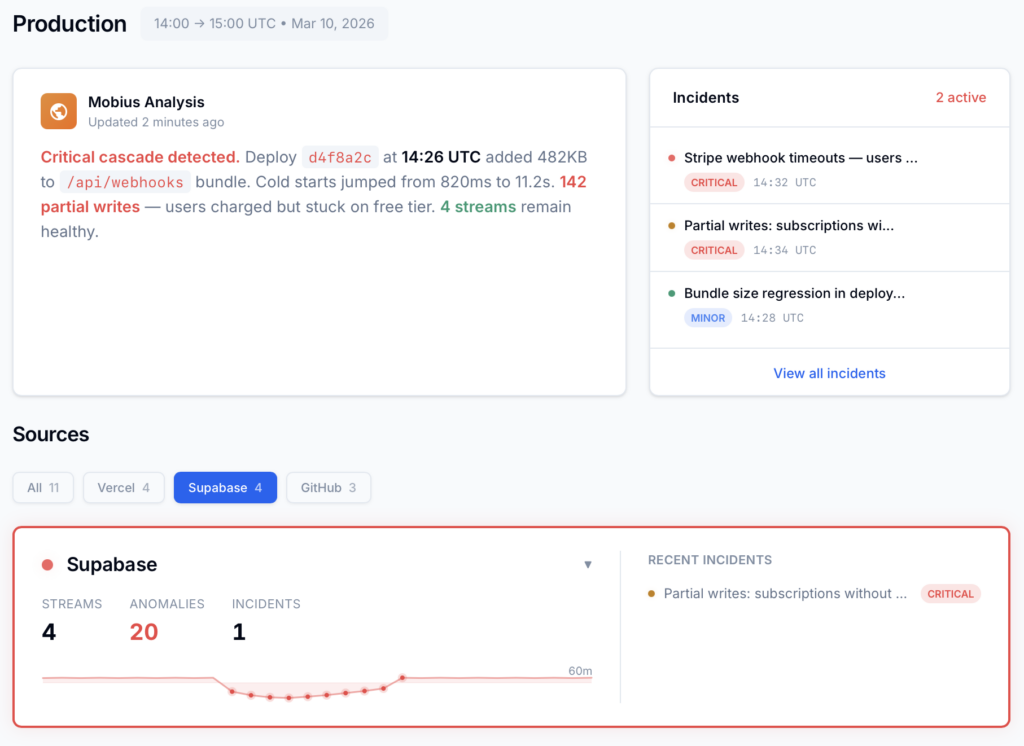
9
Supabase Log Sources To Correlate
120/min
Management API Rate Limit To Respect
30–90s
Typical Propagation Delay To Work Around
18/min
Safe Default Poll Cadence
1
Unified Stream Instead Of 9 Tabs
Six failure modes
Why Supabase RLS Errors and Edge Function Failures Take Too Long to Debug.
Supabase has logs. The problem is that the incident path is split across services, schemas, delays, and product surfaces. These are the structural reasons debugging slows down once a real request crosses Auth, Postgres, Storage, Realtime, and Edge Functions together.
01
Logs are siloed across the stack
API gateway, Postgres, Auth, Storage, Realtime, Edge Functions, PostgREST, Supavisor, and pooler events all describe the same user flow differently. A single failure can appear as a client 403, a Postgres policy rejection, and an Edge Function 500 in separate places with no automatic cross-service correlation.
# Copilot inferred from nearby code
const status = page.status.toLowerCase()
const url = page.html_url
# Live response under a different permission scope
page.status null
page.html_url undefined
TypeError · Cannot read properties of null
tests: passing on fixture
02
No streaming log API during active debugging
The Management API is polling-oriented. During an incident, you are not tailing a clean live stream. You are repeatedly querying windows of time, managing overlap, and hoping concurrent tools or teammates do not burn through rate limits when you need visibility most.
# poll-only reality
window_start = now – 90s
window_end = now
req_rate = 18/min
# overlap required to avoid propagation gaps
03
Each service hides different metadata shapes
Supabase edge function logs, database logs, Auth events, and Storage events bury key information in different nested JSON structures. The result is a constant translation tax: flattening different fields just to compare timestamps, severity, actor, or message content across services.
# three schemas for one debugging session
auth.metadata.user_id
postgres.parsed.error_severity
edge.deployment_id / execution_time_ms
# same task: find cause, compare timelines, group related failures
04
Propagation delay means the dashboard shows the recent past
When logs arrive 30 to 90 seconds late, debugging becomes a guessing game. You fix one thing, test again, and inspect a delayed picture. That slows down incident response and makes it easy to misread causality during a live rollback or deploy.
# test at 12:00:00
dashboard visible at 12:00:42
latest event != current state
wrong fix applied on stale evidence
05
No native cross-service alerting on failure patterns
An Auth brute-force attempt, a Postgres connection storm, or a wave of Edge Function exceptions all require someone to be looking. There is no built-in incident narrative that says these events are related, escalating, and probably caused by the same broken path.
# repeating signals
auth.invalid_login x42
pooler.connect_timeout x18
edge.fn errors x67
# noticed only after tickets pile up
06
RLS confusion hides the real production path
Supabase service_role bypasses RLS. That means a backend script, migration, or admin flow can appear healthy while the real authenticated client path fails. Add Storage policies, webhook workflows, MCP-driven automation, or n8n orchestration and the gap between “works for us” and “works for users” gets wider fast – and debugging that gap forces you to query logs across multiple services simultaneously. That’s exactly when teams run into Supabase’s Management API rate limits, losing visibility mid-incident.
# local test
service_role → select succeeds
# production user
anon/authenticated role → policy denies
# same table · different truth
Why this matters
Supabase does not fail because it lacks features. It fails in production when one request path crosses multiple good features at once: RLS, Auth, Storage, Edge Functions, webhooks, and external orchestration. The debugging problem is correlation, not raw log availability.
The solution
How Teams Debug Supabase Logs Without Living in the Dashboard.
The goal is not another place to read isolated log entries. The goal is to turn Supabase’s poll-based, multi-surface logging model into one continuous incident workflow with shared timestamps, normalized fields, and real cross-service correlation.
Single-pane Supabase log analysis across all major services
Pull Auth, Postgres, Storage, Edge Functions, Realtime, and platform events into one searchable stream so you can trace a single request path end to end instead of hopping between tools.
Overlap-safe polling that behaves like a continuous tail
Supabase gives you polling. Dstl8 turns that into a practical stream using safe time windows and rate-aware cadence, so active debugging feels like watching live signal instead of querying snapshots.
Per-service normalization for wildly different JSON schemas
Flatten nested metadata into consistent JSONL with standardized timestamp, severity, source, and message fields so database logs, auth events, and function failures can be compared directly.
AI-powered correlation across services, not just within one tab
Dstl8 groups related failures, surfaces likely root cause, and gives a fix-oriented narrative. Through MCP integration, you can ask questions about incidents directly from your editor without switching contexts.
Rate-aware ingestion that stays under Supabase limits
Default cadence stays comfortably below the 120 req/min ceiling, and once logs are in Dstl8 the analysis layer no longer depends on repeatedly hitting the Management API during the same incident.
What you get
What Supabase Log Analysis Looks Like When It Is Built for Production Incidents.
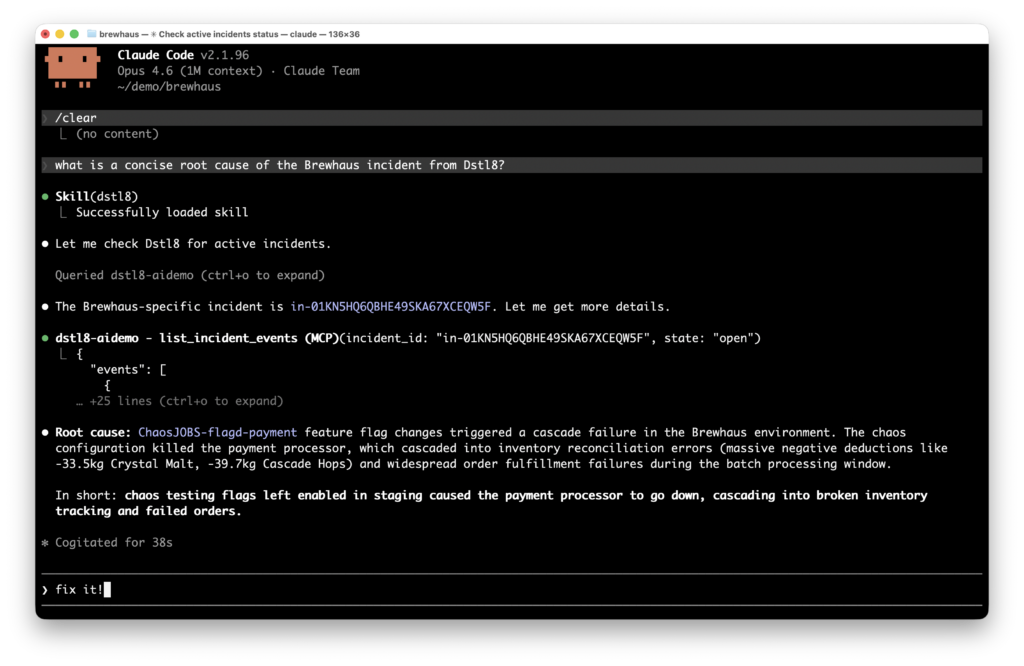
Root Cause
Diagnosis, evidence, and next steps — where you actually debug.
Dstl8 summarizes what is happening, which services are implicated, what changed, and where to look first. You can query that context directly from your editor or terminal, so you debug incidents without leaving your workflow.
Supabase RLS
Faster answers when “supabase debug rls” is the symptom, not the cause.
1 timeline across policy, auth, and function events
The question stops being “which policy failed?” and becomes “which execution path reached the policy with the wrong identity, role, or request context?”
Cross-Service Incidents
One incident view for RLS denials, Edge Function errors, Storage rejects, and Auth failures.
You do not need another isolated source viewer. You need one list of active incidents, grouped by related signal, with enough context to tell whether the failure started in policy logic, auth propagation, webhook handling, or function code.
Edge Functions
Better supabase edge function logs when function failures are not alone.
Invocation logs are useful. The real speedup happens when function errors are correlated with upstream auth state, downstream Postgres events, and adjacent webhook behavior in the same incident window.
Gonzo
Try terminal-native streaming before you commit to a bigger platform workflow.
2 min to first usable stream
Use Dstl8 CLI to turn Supabase’s poll model into an operator-friendly tail. Bring in Dstl8 when you want pattern detection, shared team visibility, and the ability to query incidents directly from your editor or terminal.
Comparison framing
Supabase Log Analysis: Your Options.
Capability
Cross-service request correlation
Continuous stream from poll-based API
Normalize auth, db, storage, and function schemas
Detect emerging failure patterns
Root cause narrative with suggested fixes
RLS, Storage, and Edge Function debugging in one view
Dashboard Only
Log Drain + Generic Tool
ControlTheory
Common questions
Supabase RLS and Edge Function Questions from Engineering Teams.
Get started
Install & Configure Dstl8 in Under 2 Minutes.
Try the Dstl8 CLI and TUI for continuous runtime feedback. Install it, add sources, connect the MCP server into Claude Code, and more.
brew install control-theory/dstl8/dstl8
dstl8 signup
curl -fsSL https://install.dstl8.ai/script/dstl8-cli | shnpx dstl8nix run github:control-theory/dstl8Download from https://github.com/control-theory/dstl8/releasesQuick Start
# 1. Install the CLI
brew install control-theory/dstl8/dstl8

# 2. Create a Dstl8 account (or `dstl8 login` if you already have one)
dstl8 signup

# 3. Add a source so logs flow in
dstl8 sources add vercel

# 4. Connect your AI agent, auto-detects MCP-compatible clients on your machine and configures them
dstl8 install --all
dstl8 install claude-code
Add Sources
# Add Sources

dstl8 sources add kubernetes
dstl8 sources add cloudwatch
dstl8 sources add vercel
dstl8 sources add supabase
dstl8 sources add otlp
dstl8 sources add github
Start Here

See what’s actually happening.
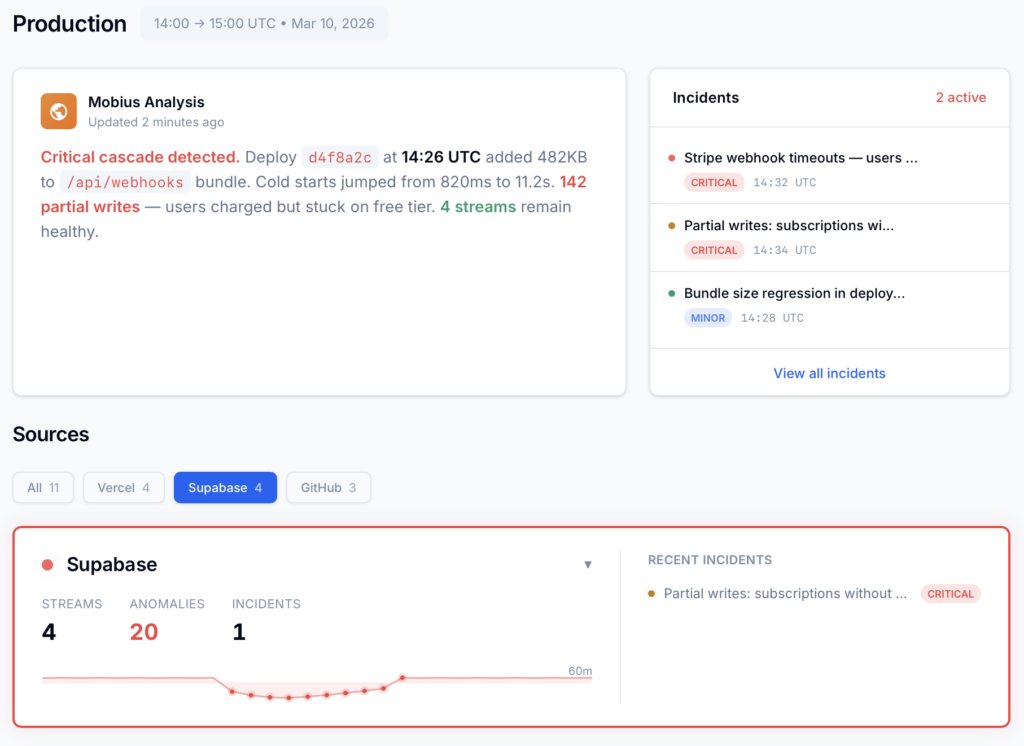
Connect your deployment chain. Surface emergent patterns. Get root cause analysis with fix recommendations — right in your editor.
↻ Intelligence that compounds — every runtime signal makes the next one sharper.
Dstl8 — Supabase runtime analysis

Open Source
Not ready for Dstl8? Start with Gonzo.
Free, open source log analysis TUI. Real-time charts, pattern detection, AI-powered insights — right in your terminal. No account, no config.
brew install gonzo
Debug Supabase Incidents Without Guessing Across 9 Log Surfaces.
Correlate and diagnose with Dstl8. Trace RLS errors, Edge Function failures, and Auth issues across services in one place — or query them directly from your workflow.
Related pages
More for AI code generation reliability.
Stop Debugging Supabase Logs.
Start Understanding Incidents.
ControlTheory gives you a single incident view and the ability to investigate it from your terminal or your editor.