



AI Coding Tools · Cursor
Cursor Writes With Confidence. Now Run it with Confidence.
Cursor gets more code to production faster than ever. Real APIs, real customers, real load — that’s where the gaps show up. Debug Cursor code fast, before runtime issues reach users. Run it with confidence.
brew install control-theory/dstl8/dstl8
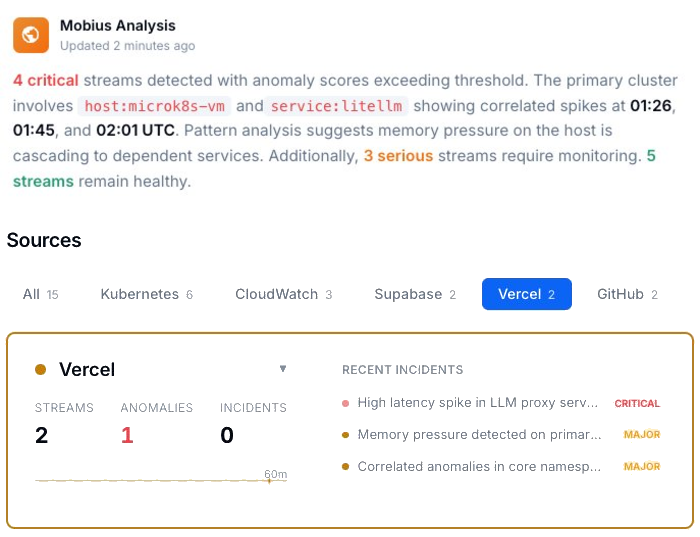
Zero
Warning Before Runtime Errors Hit
100M+
Lines of Enterprise Code Daily
17 min
Deploy to First Error
2 min
Time to First Insight
Zero
Toil. Max Confidence.
Four failure modes
Four Ways Cursor-Generated Code Breaks at Runtime.
Cursor generates code with confidence because confidence is the product – that’s what makes Cursor Tab completion and vibe coding feel so fast. What it can’t give you is certainty about runtime behavior. These four failure modes are where that gap shows up.
01
API type mismatches that only show up at runtime
Cursor Tab Completion autocompletes against what it saw in your codebase. The real API returns a string where your code expects a number, a null where it expects an object, a different date format in production than in your test fixtures. Nobody caught it because it looked right — and the type system didn’t cover the actual response shape from a live endpoint.
# Type inference at completion time
const amount = charge.amount // ← Cursor saw: number
const fee = charge.application_fee // ← Cursor saw: number
# Live API response — production
charge.amount “2000” // string
charge.application_fee null // string
ERROR NaN in invoice calculation · order #4471
Test suite: passing
02
You didn’t write these logs. You also didn’t write the ones that aren’t there.
AI-generated code produces three logging problems at once. It adds logs you didn’t write in places you wouldn’t look — unknown signal you don’t know exists. It skips failure paths entirely, because failure modes aren’t prompted and so aren’t handled or instrumented. And it drops the contextual logging any experienced developer would have added by instinct — the state before the call, the payload, the response.
When something breaks in production, you’re not just missing signal. You have ghost signal you don’t trust, silence where failures occur, and gaps where context should be. None of it you decided. It’s just there. Or it’s not.
# What AI-generated code left behind
# Ghost signal — logs you didn’t write
[INFO] cache_layer_init: true // added, no context, means nothing
# Silence — failure path, uninstrumented
(no log entry) // payment retry failed here
# Gap — context that should exist
[ERROR] downstream_timeout // no payload, no state, no user
03
Worked for the first user. Broke for the second.
Multi-tenant edge cases are almost impossible to anticipate when you’re moving fast – and Cursor’s context window doesn’t see the user it hasn’t met yet. The code handles the happy path for your first few users. Then a user with slightly different data, a different plan tier, or a different usage pattern hits a code path that was never tested. AI-generated code has no instinct for the edge cases it hasn’t seen.
# User 1 — happy path
plan_tier: “pro”
org_id: “org_1” ✓ passes RLS · data loads
# User 2 — two weeks later
plan_tier: “free”
org_id: null ✗ RLS policy rejects
✗ error swallowed · blank screen
# Neither case was in Cursor’s context
# when the query was written
04
You shipped code you don’t fully understand.
That’s not a criticism — it’s the point of AI coding tools. You move faster than you could write it yourself. But when something breaks at 2am, you’re debugging logic you didn’t write, in a codebase that moved faster than your mental model of it. The fear is real and it’s earned.
# 2:17am
ERROR Unhandled rejection · payments service
$ git log –oneline -1
a3f91bc “refactor checkout flow (cursor)”
# What changed: 340 lines
# What you remember: ~40
# Where the error is: unknown
# Time to understand: ?
Why should you care?
Cursor ships code with confidence because that’s what makes it Cursor AI coding – and vibe coding on top of it – fast. Confidence without certainty is the product – not a flaw. It’s not going to change. The gap between “this looks right” and “this runs right” is permanent, and it grows as the codebase does.
The solution
How Cursor Teams Debug Runtime Problems Fast.
The four failure modes above are structural — they don’t get patched. What changes is how fast you find them, understand them, and fix them for good.
Find the API mismatch before your users do
The live API returns a string. Your code expects a number. It passed every test. The mismatch only exists in production, with real data, against a real endpoint. That’s the Cursor issue you need to fix — but it’s catchable before a user finds it.
Edge cases that only appear at scale stop being surprises
The first user hit the happy path. The moment a code path starts behaving differently for a different data shape, plan tier, or usage pattern — you see it before a second user files a ticket.
Turn AI-generated logs into a diagnosis
Logs from code you didn’t fully write are nearly impossible to interpret on your own. You don’t know what’s signal and what’s noise. You don’t know what correlates with what. That’s not a debugging problem. It’s a comprehension problem. You get a diagnosis instead.
One answer — across every system your code touches
App logs, infrastructure events, database queries, upstream APIs — ingested together, not hunted through separately. The diagnosis comes to you.
When a pattern becomes a team problem, someone notices
The same class of failure appearing across multiple engineers’ services isn’t bad luck — it’s a signal. Dstl8 is built for that moment. Debug runtime problems fast — across every service your team ships.
What you get
How Cursor Teams Catch Runtime Failures Before They Scale.
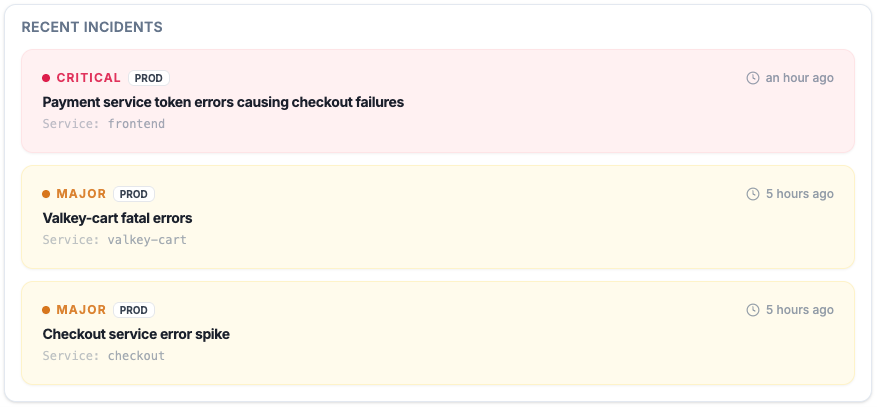
Active Incidents
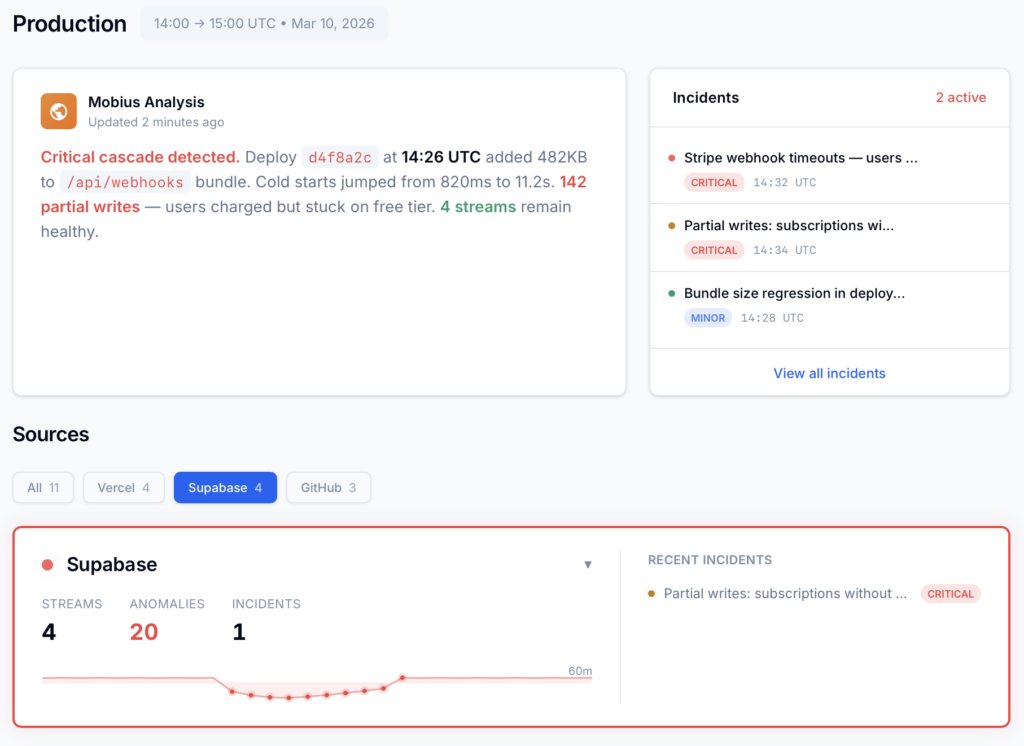
See what’s critical, what’s major, and what’s already cascading — before a user files a ticket.
Every active incident, ranked by severity, with timestamps and source. Not a log dump — a prioritized list of what needs attention right now.
Cursor at scale
The confidence gap at enterprise scale.
100M+ lines of AI-generated code per day
Every one of those lines ships with zero uncertainty signal. The gap between “this looks right” and “this runs right” doesn’t shrink as adoption grows. It scales with it.
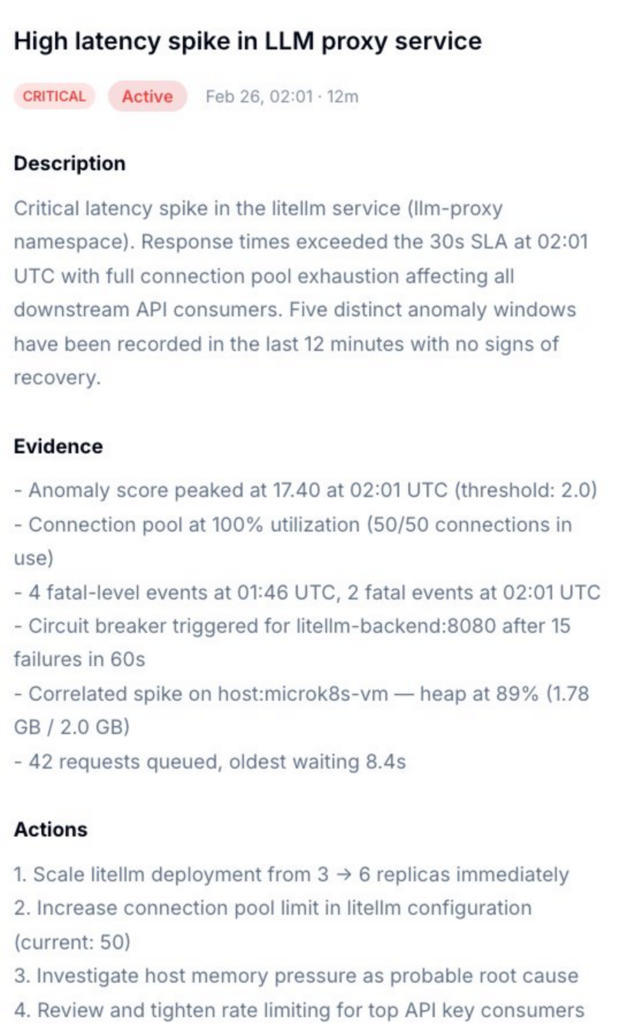
Incident Detail
Not just what broke. What caused it, and exactly what to do.
Dstl8 surfaces a diagnosis and suggests the fix. Description of what’s happening, evidence with specific data points, and a numbered action list. You’re reviewing a recommendation, not starting an investigation.
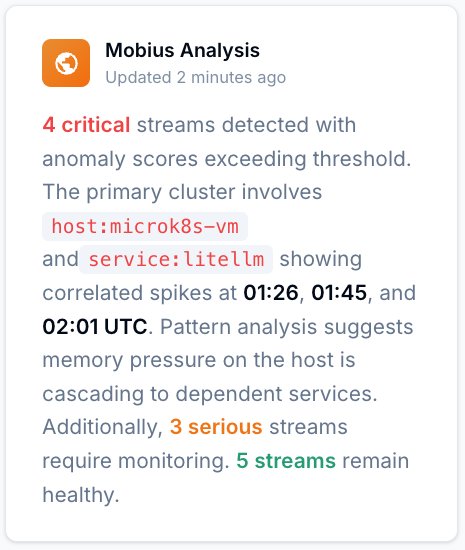
Mobius
Ask it anything about your log stream.
Natural language. Real answers from your actual data — not documentation. Mobius is Dstl8’s AI. It distills your log streams continuously, detects what’s anomalous, and tells you what to do next.
Get Started
Start with Gonzo — free, open source, 2 minutes.
2K+ GitHub stars
Gonzo is the open source log tailing tool that feeds the picture above. Terminal-native, no config, runs inside Cursor. Install it and you’re reading your log stream before the next deploy.
Vercel log analysis
Debugging AI-Generated Code: Your Options.
Capability
API type mismatches caught at runtime
Isolate which change broke production
Diagnosis with suggested actions
Localize platform vs. code failure
Cross-service pattern detection
Time to first insight
Manual
Hours
AI Coding Teams Today
Prompt by prompt
ControlTheory
2 minutes
Common questions
FAQ – AI Coding Tools – Cursor & Tab Completion
Get started
Install & Configure Dstl8 in Under 2 Minutes.
Try the Dstl8 CLI and TUI for continuous runtime feedback. Install it, add sources, connect the MCP server into Claude Code, and more.
brew install control-theory/dstl8/dstl8
dstl8 signup
curl -fsSL https://install.dstl8.ai/script/dstl8-cli | shnpx dstl8nix run github:control-theory/dstl8Download from https://github.com/control-theory/dstl8/releasesQuick Start
# 1. Install the CLI
brew install control-theory/dstl8/dstl8

# 2. Create a Dstl8 account (or `dstl8 login` if you already have one)
dstl8 signup

# 3. Add a source so logs flow in
dstl8 sources add vercel

# 4. Connect your AI agent, auto-detects MCP-compatible clients on your machine and configures them
dstl8 install --all
dstl8 install claude-code
Add Sources
# Add Sources

dstl8 sources add kubernetes
dstl8 sources add cloudwatch
dstl8 sources add vercel
dstl8 sources add supabase
dstl8 sources add otlp
dstl8 sources add github
Start Here
See what’s actually happening.
Connect your deployment chain. Surface emergent patterns. Get root cause analysis with fix recommendations — right in your editor.
↻ Intelligence that compounds — every runtime signal makes the next one sharper.
Dstl8 — Supabase runtime analysis

Open Source
Not ready for Dstl8? Start with Gonzo.
Free, open source log analysis TUI. Real-time charts, pattern detection, AI-powered insights — right in your terminal. No account, no config.
brew install gonzo
Cursor writes it. You run it with confidence.
Free account. Gonzo running against your production logs in 2 minutes. Early access to Dstl8 when it ships.
Related pages
More for the Vibe Stack.
Cursor Writes With Confidence.
Now Run it with Confidence.
Free, open source, terminal-native. Pipe your Vercel log stream in 2 minutes. No account, no config.