

Tighten your feedback loop and watch your code come alive
Many dev loops still stop at “it builds.” Maybe you’ve got tests, maybe a local run. But you’re not really seeing how your code behaves until it hits staging — and by then, the loop is too long to learn from.
Observability-Driven Development (ODD) fixes that. It means using real runtime signals — logs, spans, events — as part of how you write and test code. You don’t wait for dashboards or alerts. You just… run it, and watch.
That’s what Gonzo is built for.
Observability as part of the dev loop
The classic loop looks like this:
write → test → deploy → observeODD flips it:
By the time you’re “observing,” the code’s already baked.
write → run → observe → fix → commitYou see what your code emits while you’re building it. You fix noisy logs, missing fields, or bad instrumentation before you ever push a commit.
Getting started with Gonzo & Observability Driven Development
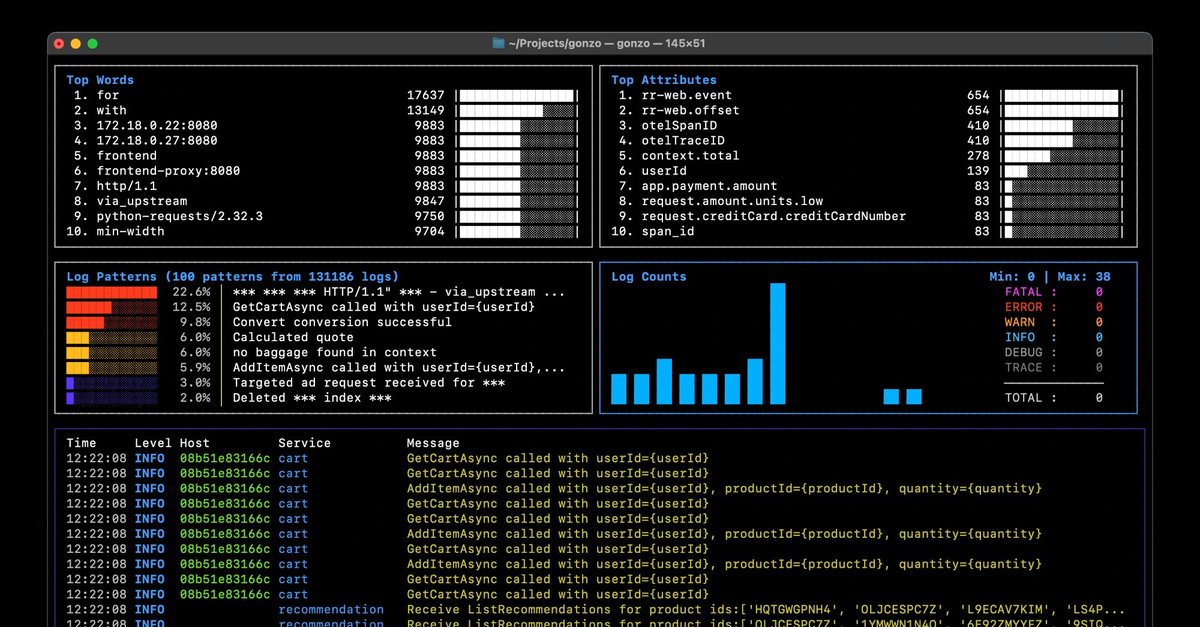
Gonzo is a terminal-native log viewer. It reads from stdin or a file, follows updates (--follow), and can even act as an OTLP receiver for OpenTelemetry logs.
Install it:
brew install gonzo
# or
go install github.com/control-theory/gonzo/cmd/gonzo@latestThen start it up:
gonzo -f application.logWhatever you feed in — stdout, Docker logs, local files — Gonzo parses and color-codes on the fly. JSON, logfmt, text… it just works.
Docker & Docker Compose
If you’re building microservices locally, you’re already halfway to ODD. Pipe your container/Docker logs straight into Gonzo:
docker logs -f my-container 2>&1 | gonzoOr for Compose:
docker compose logs -f api 2>&1 | gonzoYou’ll see structured logs in color, with real-time filtering and search. Perfect for checking whether every service is emitting the right fields — request_id, user_id, status codes — and that your log levels aren’t all over the place.
npm / Node.js apps
For Node apps, Gonzo fits right into your normal dev commands:
npm run dev 2>&1 | gonzo
# or
node server.js 2>&1 | gonzoIf you’re logging to a file instead:
gonzo -f ./logs/app.log --followGonzo auto-detects JSON and structured logs, so if you’re using pino, winston, or bunyan, you’ll get clean, readable output without a wall of braces.
Now your “npm run dev” actually shows you how your app behaves — not just whether it starts.
OpenTelemetry logs (no collector required)
You don’t need a full OTel collector setup to check that your instrumentation works. Gonzo can listen for OTLP logs directly from your app.
Start Gonzo in OTLP mode:
gonzo --otlp-enabledThat opens:
localhost:4317for gRPClocalhost:4318for HTTP
Override ports if you need to:
gonzo --otlp-enabled --otlp-grpc-port=5317 --otlp-http-port=5318Then point your app’s exporter at it:
# gRPC
export OTEL_EXPORTER_OTLP_ENDPOINT=localhost:4317
export OTEL_EXPORTER_OTLP_PROTOCOL=grpc

# or HTTP
export OTEL_EXPORTER_OTLP_ENDPOINT=http://localhost:4318/v1/logs
export OTEL_EXPORTER_OTLP_PROTOCOL=httpRun your app, and Gonzo will start showing real OTel log records — service.name, severity.text, http.method, db.system, and whatever attributes you’ve instrumented.
It’s an instant way to confirm that your telemetry wiring is right — no collector, no backend, no waiting.
Why Observability Driven Development with Gonzo?
When you use Gonzo like this, observability stops being an afterthought. It becomes part of your daily dev rhythm.
- Validate logs locally, before they drift.
- Verify OTel instrumentation while you code.
- Catch schema and attribute issues early.
- Keep feedback short, visible, and contextual.
It’s the same mindset as good testing: fast, tight loops, right where the work happens.
Quick commands
# Docker
docker logs -f my-container 2>&1 | gonzo

# Local file
gonzo -f ./logs/app.log --follow

# Node app
npm run dev 2>&1 | gonzo

# OTLP mode
gonzo --otlp-enabledClosing thought
Observability-Driven Development isn’t a framework. It’s a habit. You don’t need dashboards or alerts to build observable systems — you just need to look at what your code is already telling you.
Gonzo makes that loop visible. Right where it belongs: in your terminal.
Table of Contents
Surface Unknown Unknowns Automatically
Catch emergent patterns from AI-generated code in staging—before they become production incidents.
Learn About Dstl8 Back
Back


press@controltheory.com