




agent page
The Runtime Agent for AI-Debugging.
Sharper with Every Signal.
Möbius is the agent inside Dstl8 — a self-hosted, fine-tuned model that investigates runtime failures across your deployment chain, surfaces root cause and impact, and feeds findings back into Claude Code, Cursor, and Codex through a knowledge graph that compounds with every signal it sees.
brew install control-theory/dstl8/dstl8 && dstl8 setup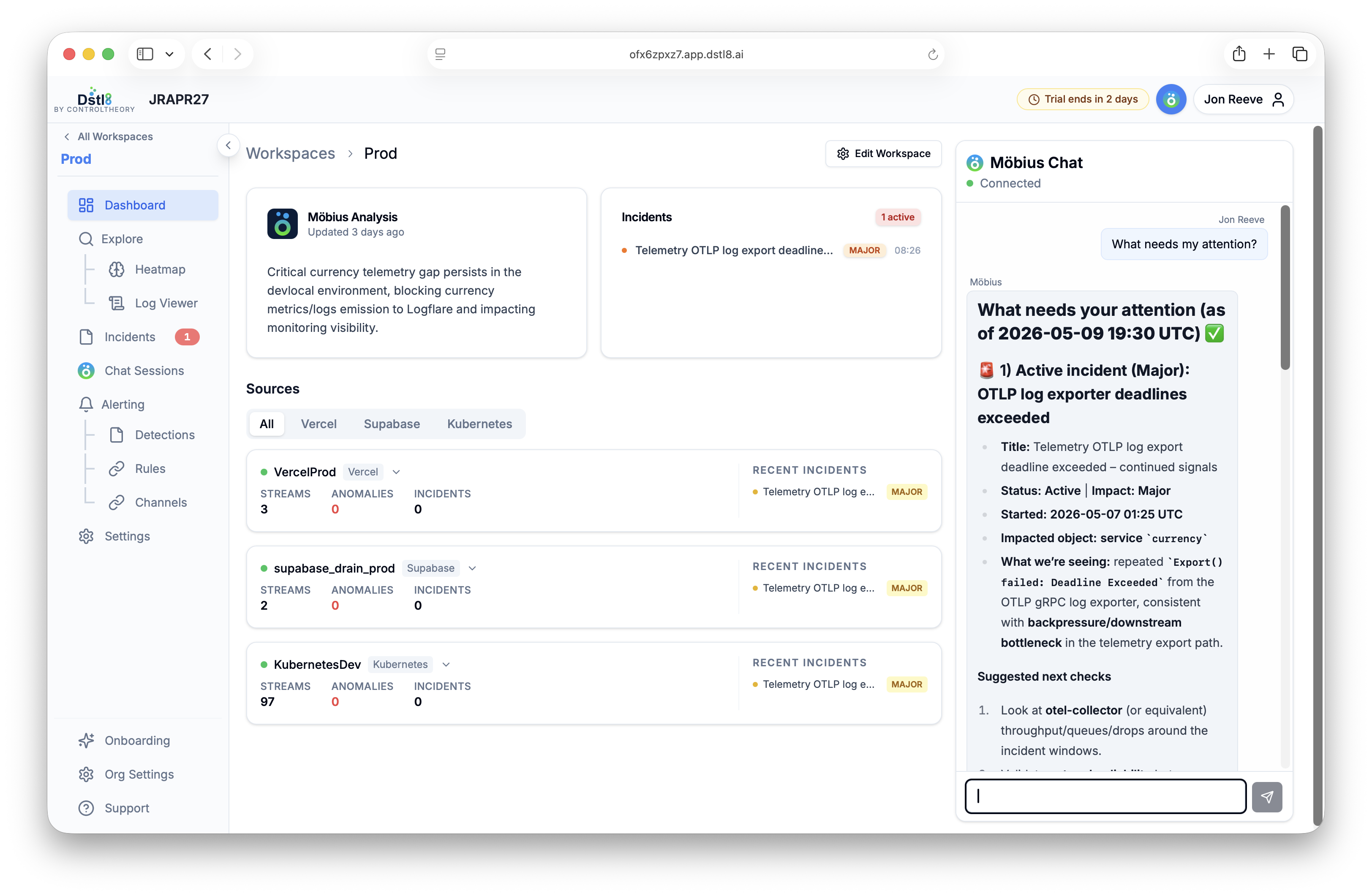
What it does
Investigates runtime. Closes the rabbit hole.
You didn’t write the code, didn’t configure the infra, and don’t have time to read every line of logs. Möbius does the investigation work AI coding tools can’t — because it’s grounded in what’s actually running, not what was generated.
01 / Casuality
Root cause analysis
Möbius traces failures across your deployment chain — Vercel, Supabase, Railway, Kubernetes, AWS, OpenTelemetry — and isolates the cause, not just the symptom. Correlates events that look unrelated until you see them next to each other.
02 / Impact
Impact assessment
Not every signal is a fire. Möbius weighs blast radius — affected users, affected requests, affected revenue paths — so you know whether to drop everything or finish the sprint.
03 / Action
Fix recommendations
Surfaces the change most likely to resolve the issue, with the runtime context to back it up. Hands it to Claude Code, Cursor, or Codex through MCP — the agent that finds the problem hands off cleanly to the agent that writes the code.
04 / Memory
Compounding knowledge graph
Every investigation gets persisted. Every runtime signal makes the next diagnosis faster and the next fix recommendation sharper. Möbius doesn’t start from zero — it starts from everything it’s seen in your stack.
Three surfaces
Lives where you work. Not in another dashboard.
Möbius is built to be called, not watched. It surfaces into the tools you already use — the terminal, your AI coding assistant, and the skill libraries that guide how investigations run.
/ CLI
Talk to your runtime from the terminal
The CLI handles setup, sources, and a full interactive TUI for log queries, incident triage, and sentiment heatmaps. Auth once, then everything Möbius can see, you can see from the terminal. More docs here…
$ dstl8 signup       # Dstl8 signup
$ dstl8 login        # auth with your org
$ dstl8 install      # interactive MCP picker
$ dstl8 sources list # list connected sources
$ dstl8 tui # launch the TUI/ MCP
36 tools your AI coding tools can call
Möbius ships an MCP server: 36 tools across 5 capability clusters — log queries, incidents, knowledge graph, workspaces, and utilities. Claude Code, Cursor, and Codex call them directly when they need runtime context — no extra config, your local credentials are used automatically. Dstl8 MCP docs…
# run in your terminal to add Dstl8 MCP
$ claude mcp add-json Dstl8 '{
  "command": "npx",
  "args": [
    "-y",
    "mcp-remote",
    "https://<org_id>.app.dstl8.ai/mcp",
    "--header",
    "Authorization: Bearer <your-token>"
  ]
}'/ Skills
SKILL.md files Möbius reads before acting
Skills are folders of best practices Möbius reads before acting. They define how to investigate (query plans, defensive patterns) and how to compound findings across runs — including the three feedback loops that drive the knowledge graph. More Skills info here…
# Starting skill moves
$ query_insights_params	#discover envs, services, time ranges
$ list_incidents	#what's going on?
$ get_sentiment_heatmap	#quick health check
$ query_log_samples #why is X broken?Get started
Install & Configure Dstl8 in Under 2 Minutes.
Try the Dstl8 CLI and TUI for continuous runtime feedback. Install it, add sources, connect the MCP server into Claude Code, and more.
brew install control-theory/dstl8/dstl8
dstl8 signup
curl -fsSL https://install.dstl8.ai/script/dstl8-cli | shnpx dstl8nix run github:control-theory/dstl8Download from https://github.com/control-theory/dstl8/releasesQuick Start
# 1. Install the CLI
brew install control-theory/dstl8/dstl8

# 2. Create a Dstl8 account (or `dstl8 login` if you already have one)
dstl8 signup

# 3. Add a source so logs flow in
dstl8 sources add vercel

# 4. Connect your AI agent, auto-detects MCP-compatible clients on your machine and configures them
dstl8 install --all
dstl8 install claude-code
Add Sources
# Add Sources

dstl8 sources add kubernetes
dstl8 sources add cloudwatch
dstl8 sources add vercel
dstl8 sources add supabase
dstl8 sources add otlp
dstl8 sources add github
See Dstl8 in Action
The feedback loop between AI-generated code and runtime reality.
// No credit card · No sales call · 3-min setup